
Risual
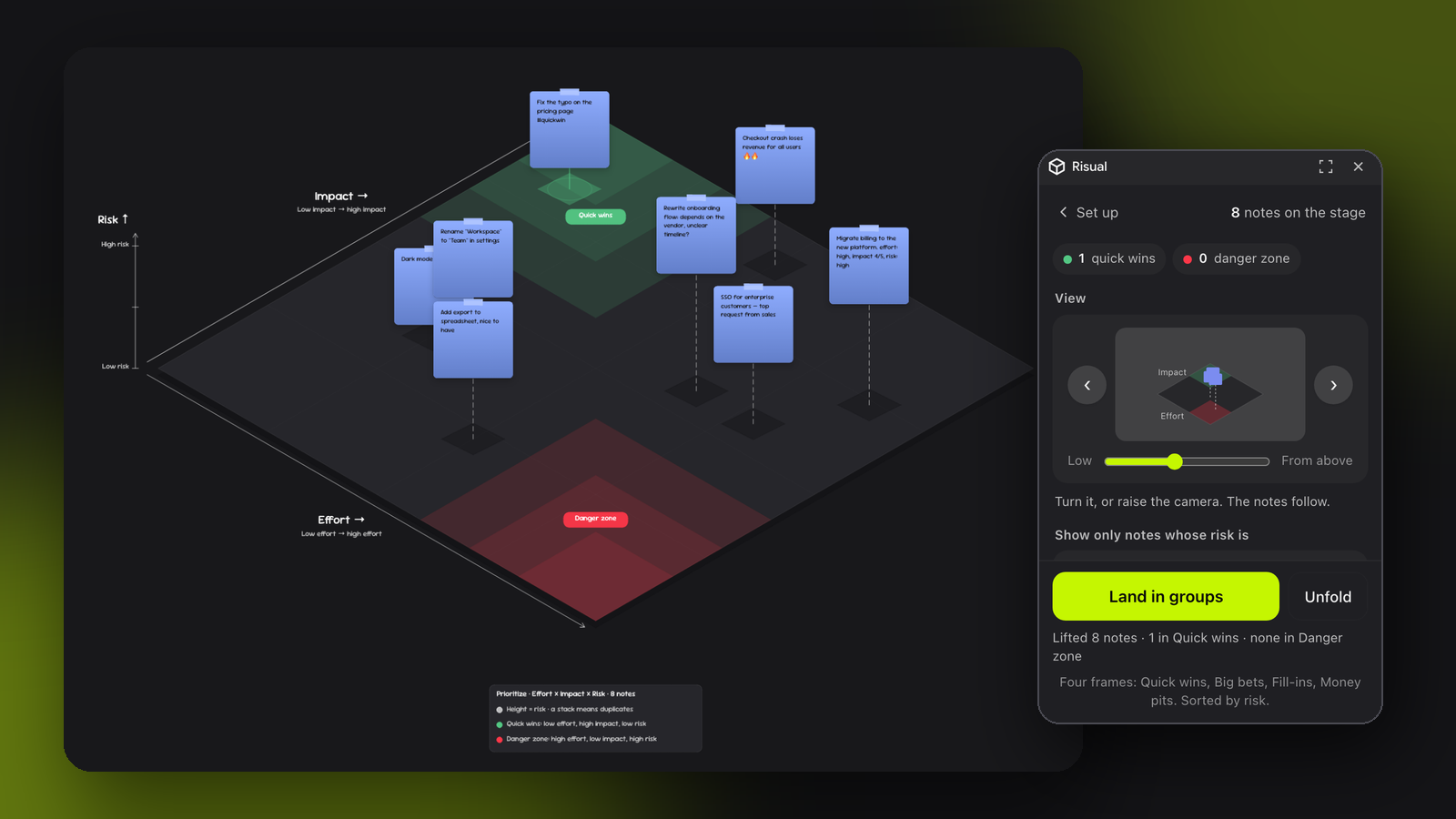
Rituals, visualised. Pick a template — Prioritize, Retrospective, Research synthesis, Pre-mortem, Brainstorm — and Risual lays your sticky notes out on it, as a classic 2D matrix or a 3D stage where a third variable lifts notes into the air. Notes are read from their tags, an on-device guess or your own Claude key; zones glow, stacks show agreement, and Land in groups turns the picture into four named frames. Unfold puts everything back.

Risual
Rituals, visualised. Pick a template — Prioritize, Retrospective, Research synthesis, Pre-mortem or Brainstorm — and Risual lays your sticky notes out on it, as the classic flat matrix or as a 3D stage where a third variable lifts notes into the air.
| Set up | Explore |
|---|---|
 |  |
Risual — fold a wall of sticky notes into a 3D matrix
After a brainstorm or a retro you have forty notes and no shape. Risual folds them, right on the board, into an isometric matrix: X and Y are two variables you choose (effort × impact by default), height is a third (risk). Quick wins glow green, the danger zone glows red, notes that land on the same spot stack into a pillar, and a slider slices the stack by height. When the conversation is done, Flatten & commit lays the notes into four named frames sorted by height, and Unfold puts everything back where it was.
The board is the stage, the panel is the controller. Everyone on the board sees the same fold; nothing happens in a private 3D viewer.
Templates: 2D or 3D
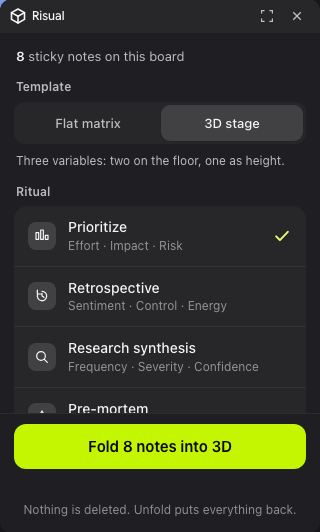
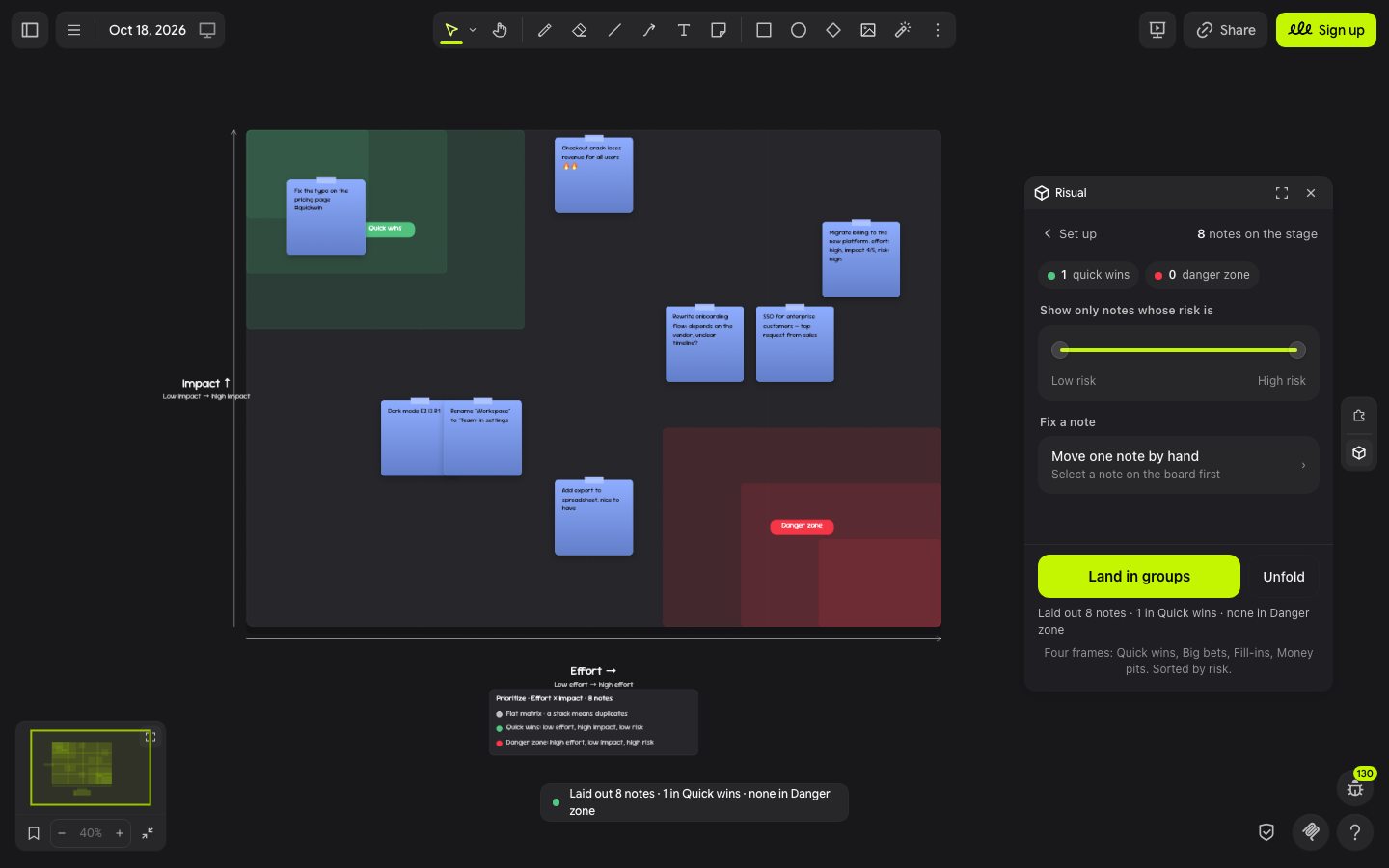
Every ritual comes as a flat matrix (the classic 2×2 your team already draws by hand: two variables, a landscape grid, zones in the corners) or as the 3D stage (the same two on the floor, a third as height). Pick in the panel; switching while folded re-lays the notes. In 2D the third variable still drives the filter and the sort order inside landed groups.
Rituals
A preset picks what the three axes mean, which corner glows and what the four flattened groups are called. The geometry never changes; the meaning does.
| Ritual | Across | Back | Height | Glows green | Glows red | Flattened groups |
|---|---|---|---|---|---|---|
| Prioritize | Effort | Impact | Risk | Quick wins | Danger zone | Quick wins · Big bets · Fill-ins · Money pits |
| Retrospective | Sentiment | Control | Energy | Celebrate | Fix first | Keep doing · Change next sprint · Lucky breaks · Accept & adapt |
| Research synthesis | Frequency | Severity | Confidence | Act on this | Anecdotes | Top pain points · Rare but severe · Common annoyances · Edge cases |
| Pre-mortem | Likelihood | Severity | Confidence | Monitor | Mitigate now | Mitigate now · Contingency plan · Accept the noise · Park it |
| Brainstorm | Feasibility | Excitement | Novelty | Build next | Parking lot | Build next · Moonshots · Safe bets · Parking lot |
In a retro, "Fix first" is what went badly, is in the team's control and people feel strongly about (exclamation marks, caps, 🔥, "+3" votes all count as energy). Pillars mean "N people felt this". You can still change any axis by hand after picking a ritual.
How scores happen
Every variable is 0..1. Three sources, in order of trust:
- Tags you typed on the note:
effort: high,impact 4/5,risk=2, compactE3 I5 R1,#quickwin/#bigbet/#moneypit/#fillin,#theme:billing, and 🔥 ⚠️ 🏋️ ⏰ emoji. Tags always win. - Guess from the words (on-device): a lexicon reads the wording — "migrate", "vendor", "unclear?" push effort and risk up; "typo", "tooltip" push effort down; "revenue", "all users" push impact up. Honest but rough, so positions use half raw score, half rank within the set.
- Ask Claude (optional): paste your own Anthropic API key in the panel. It stays in this browser (the driver's storage) and is sent only to api.anthropic.com. One request rates every note on all five variables and names a theme. Your tags and manual edits still win.
Scores are saved on each note, so a re-fold is instant and edits stick. "Edit selected note's scores" opens five sliders for the note you selected on the board and re-places it when you update.
Fourteen variables (effort, impact, risk, urgency, confidence, sentiment, control, energy, frequency, severity, likelihood, feasibility, excitement, novelty), each with a lexicon and a known "good" end. Claude is asked only about the three on stage.
Using it
- Right-click a note → Extension → Spatial → Fold notes into 3D…, or the box icon in the right rail. Select some notes first to fold only those, or fold every sticky note on the board.
- Pick a ritual, then change the axes if you like. Pick how notes are read (guess from the words, or ask Claude). Fold. The panel says what will happen before you press anything.
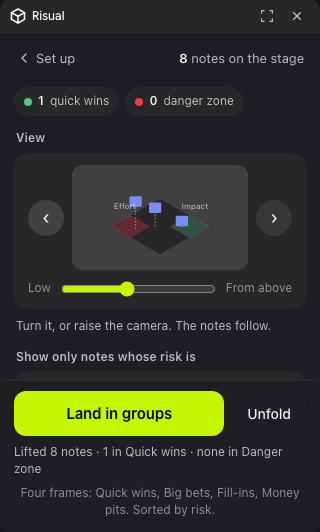
- Look at it differently: a small live preview of the stage sits between two chevrons; turn it, or slide the camera from Low to From above, and the preview shows the view before the notes glide to match it. Labels follow their edges; From above flattens heights into a map.
- Show only notes whose … is dims notes outside the range to 15%.
- Move one note by hand to correct a placement with five sliders.
- Land in groups → four frames (Quick wins, Big bets, Fill-ins, Money pits for the default axes), notes sorted by height, lowest first.
- Unfold → notes glide back to their original spots; the stage and the group frames go.
Development
npm install
npm test          # tag parsing, lexicon ranking, stage geometry, flatten layout
npm run dev       # dev server on :5185 (⌘K → "Add extension dev server")
npm run build     # dist/drawdy-risual.drawdyx
npm run test:live # headless Chromium: 8 notes, fold, slice, re-fold, flatten, unfold
Verified live (2026-10-18): fold, slice, re-fold on another axis, flatten, unfold, with Quick guess scoring; the Retrospective preset folded on its own vocabulary. Not verified live: the Claude path (needs a key; the request shape and JSON parsing are unit-tested), and editing a selected note's scores (the panel flow is wired; selection in the harness was not exercised).
Design notes
- The stage is one projection with two knobs: quarter turns rotate plane coordinates about the centre before projecting, and tilt scales the vertical squash (0.5 is isometric; 0.8 nearly top-down, with lift shrinking to match). Every label is placed relative to its own edge and the plane's centre, so no view needs special cases.
- Stage furniture is added on a low
layerand notes are raised to a high one, so the plane, zones, shadows and stems sit under the notes even though they were created later. - Notes move through
begin-preview/preview-transforms/end-preview, so the fold is one undo step and nothing syncs until it lands. - Zones are decided by the raw scores; positions by raw + rank, so a wall of similar guesses still spreads out without inventing differences between identical scores.
Panel
Two screens. Set up is a grouped list of rituals (icon, name, its three variables), an Axes row that expands only if you want it, one segmented control for how notes are read, and a pinned primary button that names the outcome ("Fold 8 notes into 3D") with one caption under it ("Nothing is deleted. Unfold puts everything back."). Explore opens after the fold: a back control to Set up that keeps the fold, a summary as chips, a live preview of the stage with two chevrons and one camera slider, a filter by height, "Move one note by hand", and a pinned pair of actions: Land in groups and Unfold. Every label says what will happen; help text is one line and appears only where a choice needs it.