
Paper Stage
Step inside the floor plan you drew. Walls rise, doodles stand up as paper cutouts, and your friends reach in as giant hands.

Paper Stage for Drawdy
Paper Stage turns a floor plan drawn on your board into a 3D place you and your friends can walk through together.
Install the extension, click the house button, then click into the 3D view and walk with WASD.
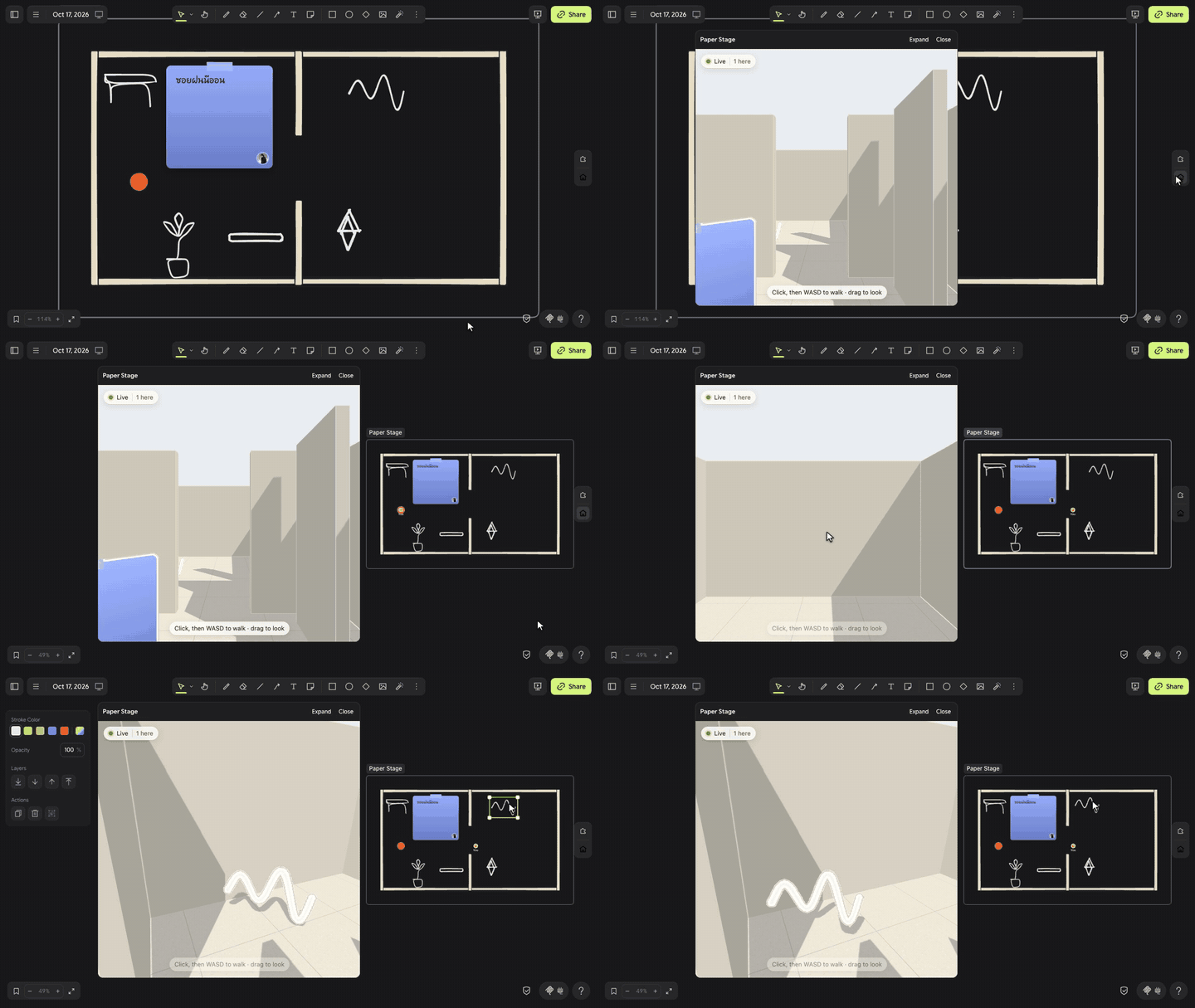
Watch the full demo video.
How to use
- Open the stage. Click the house button on the right edge of the board. The first time, click Allow on the permission prompt. A frame named "Paper Stage" appears with a starter two-room floor plan, and the 3D view opens docked at the left side of the window. The rest of the board stays in sight and you can keep drawing on it. Click Expand in the view's title bar for a large view, and Dock to put it back at the side.
- Walk in. Click inside the 3D view once so it hears the keyboard. Walk with WASD or the arrow keys, and drag to look around. Walls block you, so use the doorway.
- Draw on the plan. Draw a rectangle, circle, or diamond inside the frame, and it stands up as a wall. Draw a doodle, add a sticky note, type some text, or drop an image, and it stands up as a paper cutout that turns to face you.
- Invite people in. Everyone on the board who clicks the house button joins the same stage. While they walk, each one shows in the 3D view as a named paper figure and on the board as a named dot. Your own dot reads "You" on your board. The cursors of people on the board show in the 3D view as giant named hands.
- Keep editing. Drag a doodle or draw a new wall on the board, and the 3D view updates while you watch.
| Interaction | What happens |
|---|---|
| Click the house button | Adds the Paper Stage frame if the board has none, then opens the 3D view docked at the left |
| Click the house button again | Hides the 3D view. The next click shows it again. |
| Click inside the 3D view | Sends your keyboard to the view |
W A S D or the arrow keys | Walks forward, left, back, and right |
Q or E | Turns left or right |
Hold Shift while walking | Runs |
| Drag inside the 3D view | Looks around |
F | Shows or hides the frame rate |
| Expand in the view's title bar | Enlarges the 3D view to cover most of the window |
| Dock in the view's title bar | Puts the 3D view back at the left side, beside the board. The view keeps the size you chose until you reload the board. |
| Close in the view's title bar | Hides the 3D view. The frame and your drawings stay on the board. |
| Move, draw, or delete inside the frame | Updates the 3D view live for everyone on the stage |
Good to know
- A floor plan made of rectangles works best. A thin rectangle stands up as one solid wall. A large rectangle stands up as a room with four walls and no door. To make a doorway, leave a gap between two thin rectangles.
- Rectangles, circles, and diamonds become walls. Everything else inside the frame becomes a paper cutout. That includes stickies, doodles, text, images, lines, and arrows.
- A cutout stands at most 1.2 m tall and keeps its proportions. Walls stand 2.6 m tall.
- A stage holds up to 400 items and up to 60 cutouts.
- Only items inside the Paper Stage frame appear in the 3D view. The rest of the board stays out of it.
- Nothing in the stage comes from AI. Every wall and cutout is something a person drew.
Uses
- Feel the size of a room. Draw a bedroom or an office layout to scale and walk through it before you move a single desk.
- Play a level your friends drew. One person draws a maze, everyone else walks it and leaves sticky notes at the dead ends.
- Tour a map with a class. A teacher draws a museum or a town, and students walk it together while the teacher points with a giant hand.
- Start a stand-up somewhere new. Put each person's update on a sticky and walk the room together.
Privacy
Paper Stage syncs each stage through a small server on Cloudflare that the extension's author runs. The server stores the stage's frame, its walls, the position of each item, and a picture of each cutout, so everyone on the stage sees the same thing. It never stores anything from outside the Paper Stage frame.
People's names, walking positions, and cursors pass through the server to the others on the same stage. The server does not store them. Joining a stage takes the secret token saved in its frame on the board.
Credits
- three.js draws the 3D view. MIT license.
- The server started from earendil-works/pi-durable-cloudflare. MIT license.
- The server keeps its connections and saved state with
@earendil-works/pi-durable.
Develop
src/is the Drawdy driver. Drawdy buildssrc/index.tswith esbuild.view/is the 3D view.npm run build:viewbundles it intosrc/view-html.ts.shared/protocol.tsis the wire protocol that the driver, the view, and the server share.backend/is the server, a Cloudflare Durable Object. Seebackend/README.md.
Run npm install, then npm run dev to serve the driver on port 5173 for Drawdy's dev server link. Run npm test and npm run typecheck before you push.