Aurora
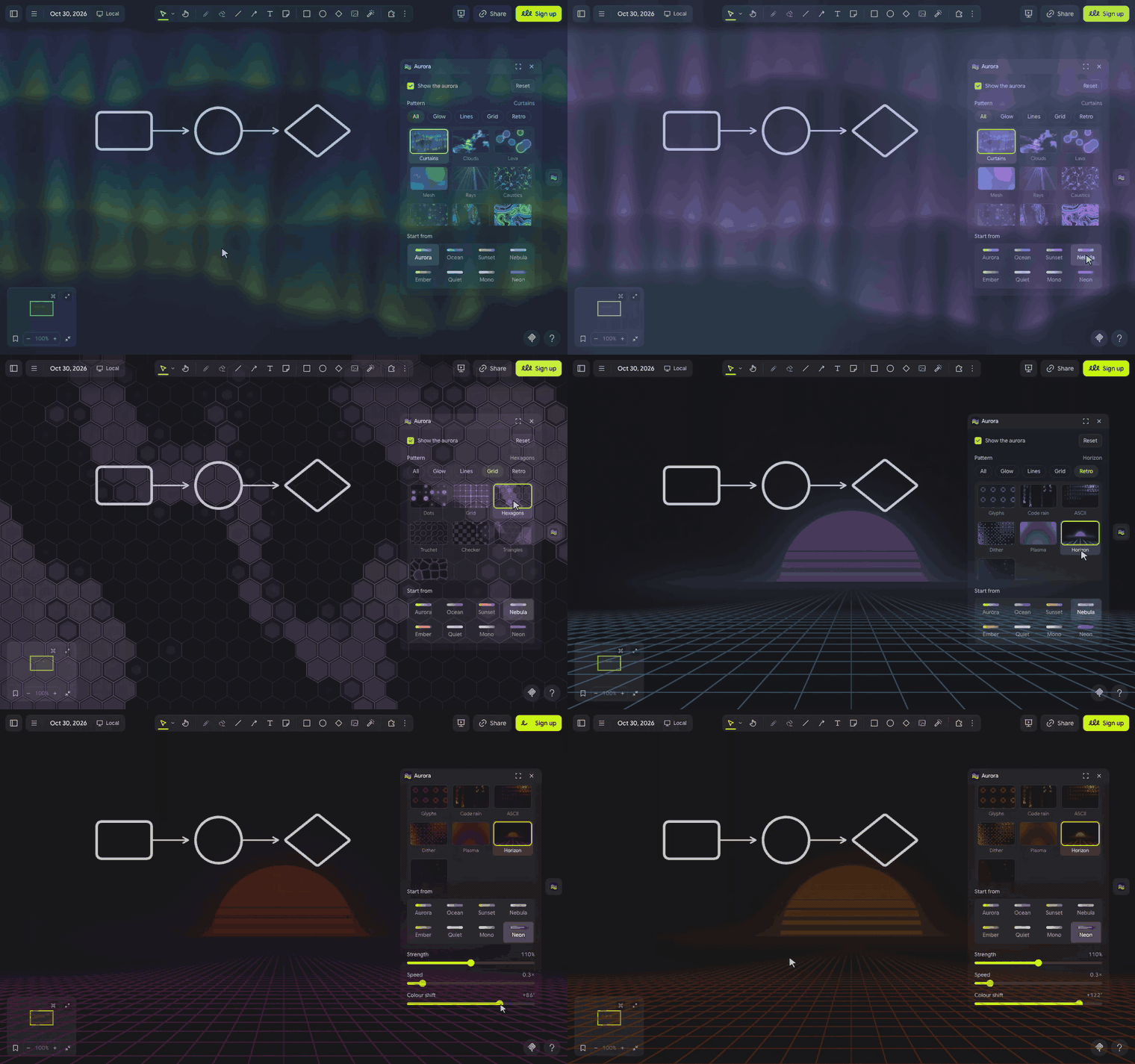
Let your board glow. Click the aurora button and a living pattern drifts across your whole board while you draw. Pick from 30 designs in four groups, from aurora curtains and caustics to contour lines, hexagons, code rain and a synthwave horizon. Start from one of eight colour sets, then tune strength, speed, colour, scale and haze live as you drag. Clicks pass straight through and only you see it. Made for long whiteboard sessions and screen shares that need a little mood.

Aurora ˚₊‧꒰ა ☆ ໒꒱ ‧₊˚
let your board glow.
A living pattern drifts across your whole board while you draw. Pick one of 30 designs, from aurora curtains and caustics to contour lines, hexagons, code rain and a synthwave horizon, then tune it with a few sliders and watch the board change as you drag. ✧
let's glow ٩(◕‿◕)۶
- Click the aurora waves in the extension rail. The Aurora panel opens and the glow fades in.
- Scroll the Pattern grid (or tap Glow, Lines, Grid or Retro to narrow it), then pick a colour set under Start from.
- Drag the sliders to make it yours; the board follows as you drag.
- Untick Show the aurora to turn it off. Your look is kept for next time.
(・_・;) nothing shows? If your system asks for reduced motion, Aurora shows a still glow instead of a moving one.
make it yours (。•̀ᴗ-)✧
- Pattern: 30 designs in four groups. Glow: Curtains, Clouds, Lava, Mesh, Rays, Caustics, Bokeh, Smoke. Lines: Contours, Flow, Waves, Moiré, Ripples, Stripes, Ridges, Hatch. Grid: Dots, Grid, Hexagons, Truchet, Checker, Triangles, Cells. Retro: Glyphs, Code rain, ASCII, Dither, Plasma, Horizon, Stars.
- Start from: Aurora, Ocean, Sunset, Nebula, Ember, Quiet, Mono or Neon, each with its own colours and slider settings.
- Strength: from a whisper to a full sky.
- Speed: from frozen to lively.
- Colour shift: turns every colour of the starting point around the colour wheel.
- Scale: the size of the pattern's main feature, named for each pattern (curtain height, cell size, line spacing and so on).
- Haze: the soft glow between the curtains.
- Reset takes the sliders back to the starting point you picked.
little things to try (っ˘ω˘ς )
- Quiet at low speed for long focused sessions.
- Nebula with tall curtains for a late-night sketch.
- Ember with the colour shifted a little for a warm demo on a screen share.
- Glyphs in Mono or Neon for a textmode, hacker-terminal board.
- Contours in Ocean with a large line spacing for a calm map-like backdrop.
the small print: the panel's font, Google Sans Flex (OFL), loads from jsDelivr; nothing else downloads, nothing you draw leaves your board, and nothing is added to it: only you see the aurora. It sits over the board, so your drawings show a faint tint and every click goes straight through. Your starting point, sliders and on or off are kept in this browser. It follows Drawdy's light or dark theme. Code MIT; building it yourself? See DEVELOPMENT.md.