Gesture Remote
Wave, and the board listens. Open Gesture Remote and your webcam turns your hand into a remote: point to move a cursor, pinch to click, drag or draw with the current tool, make a fist to pan and pull two fists apart to zoom. Thumbs down undoes, a victory sign switches tools and an open palm shows the whole board or swipes between frames. Made for presenters, workshop hosts and anyone sketching standing up.

Gesture Remote ヾ(^∇^)
wave, and the board listens.
Gesture Remote turns your hand into a remote for the board through your webcam: point to move a cursor, pinch to draw or drag, make a fist to pan. It's for the moments you're presenting, teaching or sketching on your feet, when reaching for the mouse breaks the flow ✧
let's wave ٩(◕‿◕)۶
- Click the hand in the extension rail.
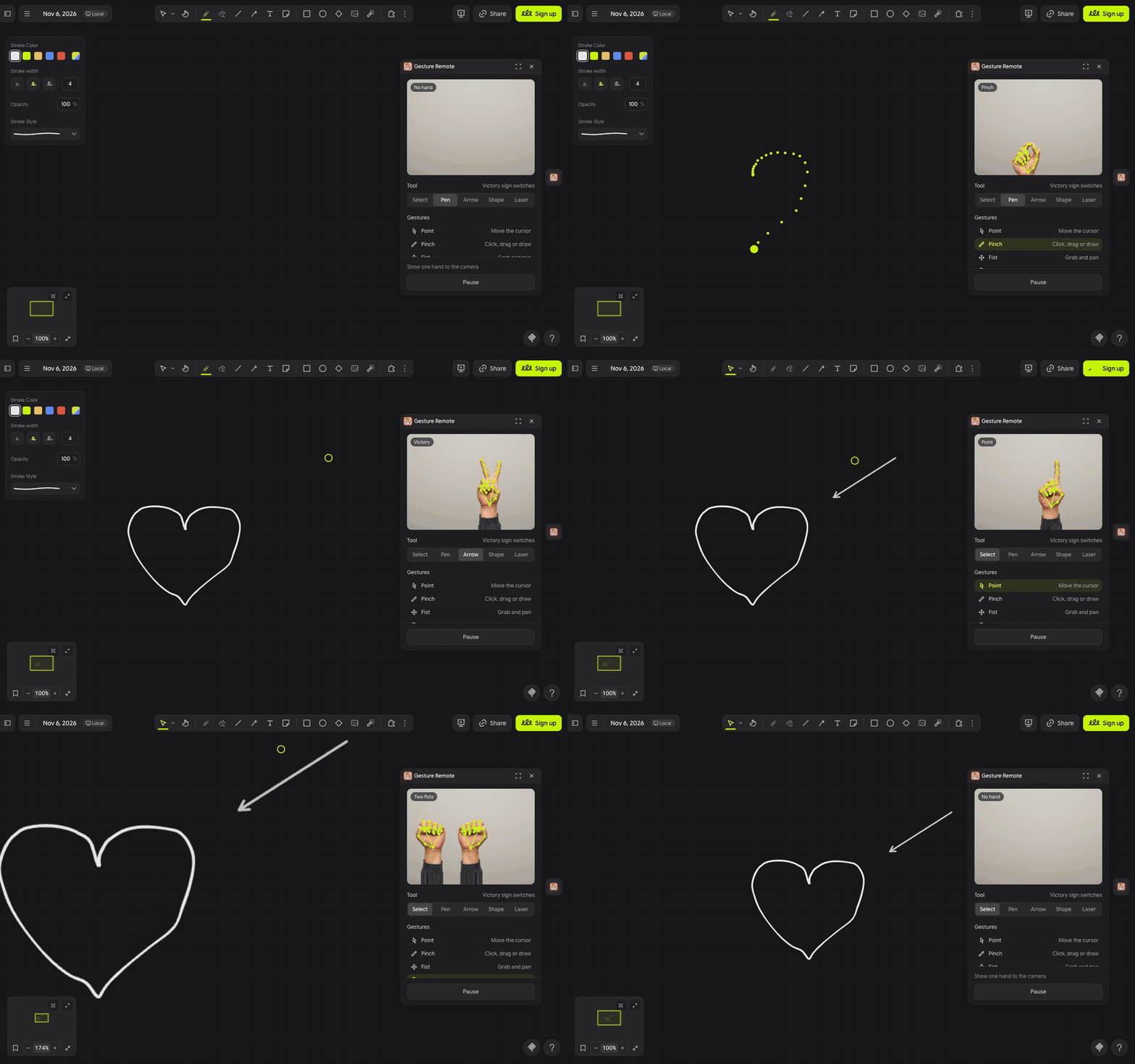
- The first time, Drawdy and then your browser each ask to use the camera. Click Allow on both, and your hand shows up in the panel with its joints traced over it.
- Point one finger to move the cursor, then pinch your thumb and finger together to click, drag or draw with the tool picked under Tool.
- Make a fist to grab and pan, pull two fists apart to zoom, and hold up an open palm to see the whole board. Press Pause or Space when you need your hands back.
(・_・;) Nothing happens when I wave? Keep the panel open, since the camera stops when it closes, and face the light so the camera sees your hand clearly.
make it yours (。•̀ᴗ-)✧
- Tool: Select, Pen, Arrow, Shape or Laser. Click one, or hold up a victory sign to step to the next.
- Open palm, swipe: swipe left for the next frame and right for the previous one, like turning pages on a phone.
- Gestures: the list lights up the gesture the camera sees, so you know what it read.
- Pause: stops the camera and hides the cursor; Resume starts them again.
little things to try (っ˘ω˘ς )
- Present a board of frames standing up: swipe through them and circle each point with the Laser.
- Run a workshop from across the room and pan to each group's corner with a fist.
- Sketch a quick diagram with Pen, then give the wobbly line a thumbs down.
- Zoom into a detail with two fists, then hold up an open palm to jump back to the whole board.
the small print: when the panel opens it downloads Google's MediaPipe hand tracking, the model from Google's MediaPipe storage and its WebAssembly runtime from jsDelivr, plus the panel's font from jsDelivr; nothing you draw or type leaves your board. Your video never leaves the browser: the camera picture stays in the panel, Drawdy runs the camera only while the panel is open, and Gesture Remote saves nothing. What you draw or move changes your board like any other edit. Hand tracking by MediaPipe, Apache 2.0. Code MIT; building it yourself? See DEVELOPMENT.md.