
IRL Eyedropper
Pick colours from real life. Hold a leaf, a fabric scrap or a paint chip up to your webcam, tap it in the preview and the colour becomes your pen colour, lands in your swatches and can paint selected shapes. Set white with a sheet of paper so lamps and screens don't tint the result, then add your swatches to the board as a labelled palette. Made for designers, illustrators and moodboard makers.

IRL Eyedropper (⊙_◎)
pick colours from real life.
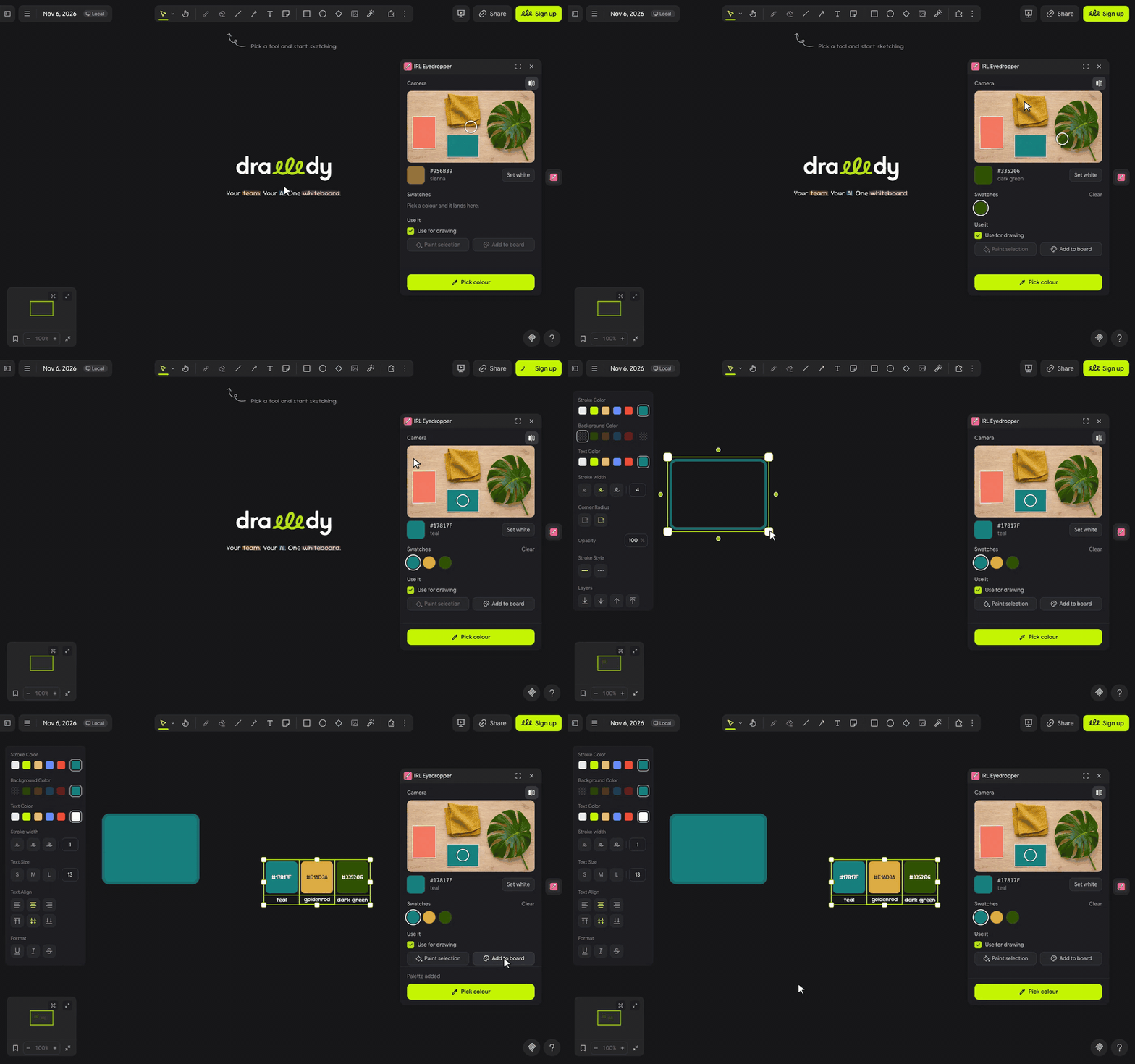
IRL Eyedropper turns your webcam into an eyedropper: hold up a leaf, a scrap of fabric or a paint chip, tap it in the preview and that colour is your pen. Your picks pile up as swatches you can paint shapes with or drop on the board as a labelled palette ✧
let's pick ٩(◕‿◕)۶
- Click the drop in the extension rail. The first time, Drawdy and then your browser ask to use the camera; click Allow on both.
- Hold the thing you love up to the camera and tap it in the preview, or put it under the ring and press Pick colour (Space or Enter work too).
- The colour becomes your pen and shape stroke colour and lands in Swatches. Click any swatch to draw with it again.
- Select shapes, text or lines and press Paint selection, or press Add to board to drop your swatches as a palette with their hex codes and colour names.
(・_・;) colours look off? Lamps and screens tint the picture. Hold a sheet of white paper under the ring in good light and press Set white, then pick again.
make it yours (。•̀ᴗ-)✧
- Set white: corrects the camera's colour cast for the rest of the session; Reset undoes it.
- Use for drawing: on by default. Turn it off to collect swatches without changing your pen.
- Mirror: on by default, like a selfie camera. The ring follows whatever it was on.
- Swatches: your last 16 picks, newest first. A colour close to one you already have moves that swatch to the front instead of adding a twin.
little things to try (っ˘ω˘ς )
- Pick the greens of a houseplant and paint a whole mind map with them.
- Build a moodboard palette from your sofa, your rug and your favourite mug.
- Match a brand colour from a printed card or a product box before you sketch.
- Sample paint chips at the hardware store, then try them on a floor plan.
the small print: the panel loads its font from jsDelivr and fetches nothing else. Drawdy runs the camera only while the panel is open, and the video never leaves your browser: colours are read from the picture right in the panel. Your swatches and the Use for drawing choice are saved in Drawdy's extension storage. Code MIT; building it yourself? See DEVELOPMENT.md.