Kaleidoscope
Draw one stroke, get a mandala. Click the flower, pick Pencil, Line or Arrow in Drawdy's toolbar and draw: everything you finish is copied around a centre point, turned and mirrored. Choose 2, 3, 4, 6, 8 or 12 segments, turn Mirror on or off, and Recentre to the middle of your view. Dashed guides only you see mark the segments, and one undo takes the copies away. Made for mandalas, snowflakes and doodling on calls.

Kaleidoscope ✿(◠‿◠)✿
draw one stroke, get a mandala.
Every pencil stroke, line and arrow you finish comes back around a centre point, turned and mirrored like a real kaleidoscope. A few squiggles become a snowflake, a flower or a mandala in seconds ✧
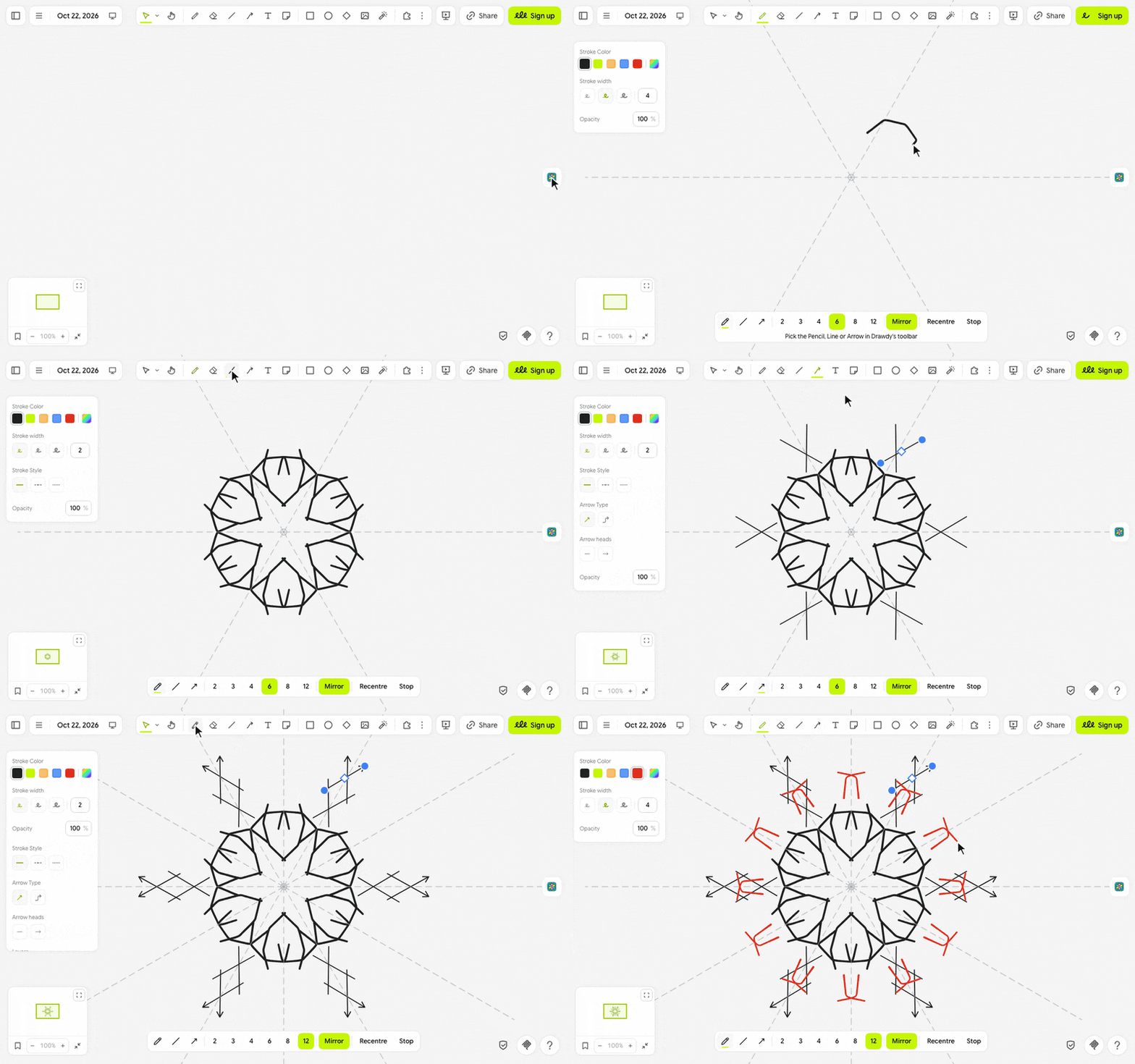
let's draw ٩(◕‿◕)۶
- Click the flower in the extension rail.
- A bar opens at the bottom of the screen and dashed guide lines fan out from the middle of your view. Pick the Pencil, Line or Arrow in Drawdy's toolbar; the bar lights up the one you're using. Then choose 2, 3, 4, 6, 8 or 12 segments.
- Draw. Everything you finish is copied into each segment; collaborators' drawings are left alone.
- Click Stop or press Escape when you're done.
(・_・;) nothing gets copied? Only Pencil, Line and Arrow are mirrored; shapes and text are left alone.
make it yours (。•̀ᴗ-)✧
- Segments: 2, 3, 4, 6, 8 or 12 copies around the centre, 6 to start.
- Mirror: adds every copy flipped as well, like a real kaleidoscope. It starts on.
- Recentre: moves the centre to the middle of your view, so pan first, then click.
- Guide lines: dashed spokes and a small ring at the centre, on your screen only. They go when you stop.
little things to try (っ˘ω˘ς )
- A snowflake: 6 segments with Mirror, then short zigzags from the centre outwards.
- A flower: 8 segments, one petal-shaped loop, then a dot in the middle.
- A mandala for a card: start on 12 near the centre, then switch to 6 for the outer petals.
- Pan to an empty spot and click Recentre for a second pattern beside the first.
the small print: nothing downloads, and nothing you draw leaves your board; the copies are ordinary strokes everyone sees, in your colour, width, dash and opacity, and the default ink keeps following the board theme. Your segments and Mirror choice stay in this browser. Textured pencil strokes are copied without their texture, arrow copies get Drawdy's standard arrowhead, and elbow arrows aren't mirrored. Drawdy goes back to Select after each line or arrow, so pick Line or Arrow again for the next one. Bar icons from Lucide (ISC). Code MIT; building it yourself? See DEVELOPMENT.md.