
Photobooth
Say cheese, right on the board. Open Photobooth to see yourself through your webcam in 32 live filters, from Noir and Film to Comic, VHS and funhouse warps like Bulge and Twirl. Pick one and press the shutter: a 3-second countdown gives you time to pose, then the photo lands in view beside your earlier shots. The camera runs only while the panel is open. Made for team boards, retros, show and tell and moodboards.

Photobooth ✌(◕‿-)✌
say cheese. it lands on the board.
Photobooth shows you live through your webcam in 32 filters, from film looks to comic art to funhouse warps, and drops the photo you take straight onto the board. It's the quickest way to put faces on a team board, show off a sketch or a pet, or give a moodboard a film or comic look ♡
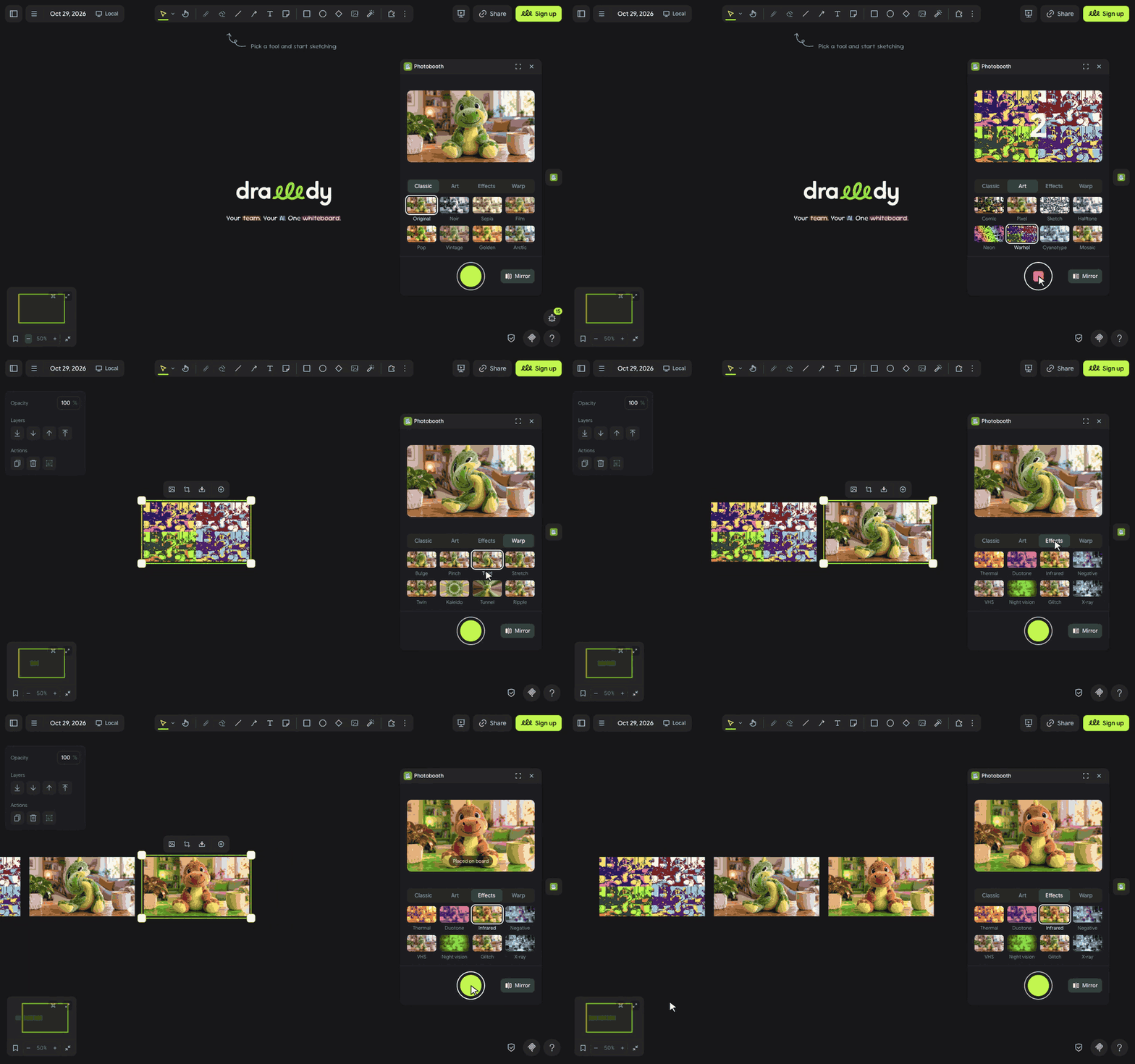
let's shoot ٩(◕‿◕)۶
- Click the instant photo in the extension rail.
- The first time, Drawdy and then your browser each ask to use the camera. Click Allow on both, and you show up live in the panel.
- Pick a group (Classic, Art, Effects or Warp), then a filter. Every tile shows you live, and the arrow keys move between them.
- Press the round shutter and pose during the 3-second countdown (press it again or Escape to stop). The photo lands in view, selected and ready to move; the next one lines up beside it.
(・_・;) It says Camera blocked? Allow the camera for this site in your browser's site settings and for Photobooth under Manage permissions, then click Try again.
make it yours (。•̀ᴗ-)✧
- 32 filters in four groups: Classic looks like Noir, Film and Golden; Art like Comic, Halftone and Warhol; Effects like VHS, Night vision and Glitch; and Warp, funhouse mirrors like Bulge, Twirl and Kaleido.
- Mirror: on by default, like a selfie camera. The photo is mirrored the same way as the preview, so it matches what you saw.
- HD photos: each photo is 480 units wide on the board and taken at up to 1280×720, so it stays sharp when you zoom in.
little things to try (っ˘ω˘ς )
- Open a retro with everyone's face in Bulge, then switch to Noir for the serious part.
- Hold a paper sketch up to the camera and drop it next to the digital version.
- Make a moodboard of your desk, your mug and your plant, all in Film.
- Shoot the same pose in Warhol, Neon and Halftone and line them up like a gallery wall.
the small print: Drawdy runs the camera only while the panel is open, your browser shows its camera light while it runs, and closing the panel turns it off. The live picture stays in the panel; only the photo you take goes onto the board, like any image you add, so on a cloud board it is uploaded with the board and on a local board it stays in this browser. The panel loads its font from jsDelivr and fetches nothing else, and Photobooth saves no data of its own. Code MIT; building it yourself? See DEVELOPMENT.md.