Timer
Keep the room on time. Click the stopwatch in the rail and a timer lands on the board, ticking on every screen, even for people without Timer. Pick 1, 3, 5, 10, 15 or 25 minutes, add a label and press Start on the timer itself. Pause, add a minute or reset from its buttons, the panel or the right-click menu, and hear a soft chime or a bell at the end. Made for workshops, retros, critiques and focus sprints.

Timer ⏱(`・ω・´)
keep the room on time.
A countdown that lives on the board, so everyone in the session watches the same clock. Start a five-minute brainstorm and the timer ticks on every screen, even for people who don't have Timer, then chimes when time is up ✧
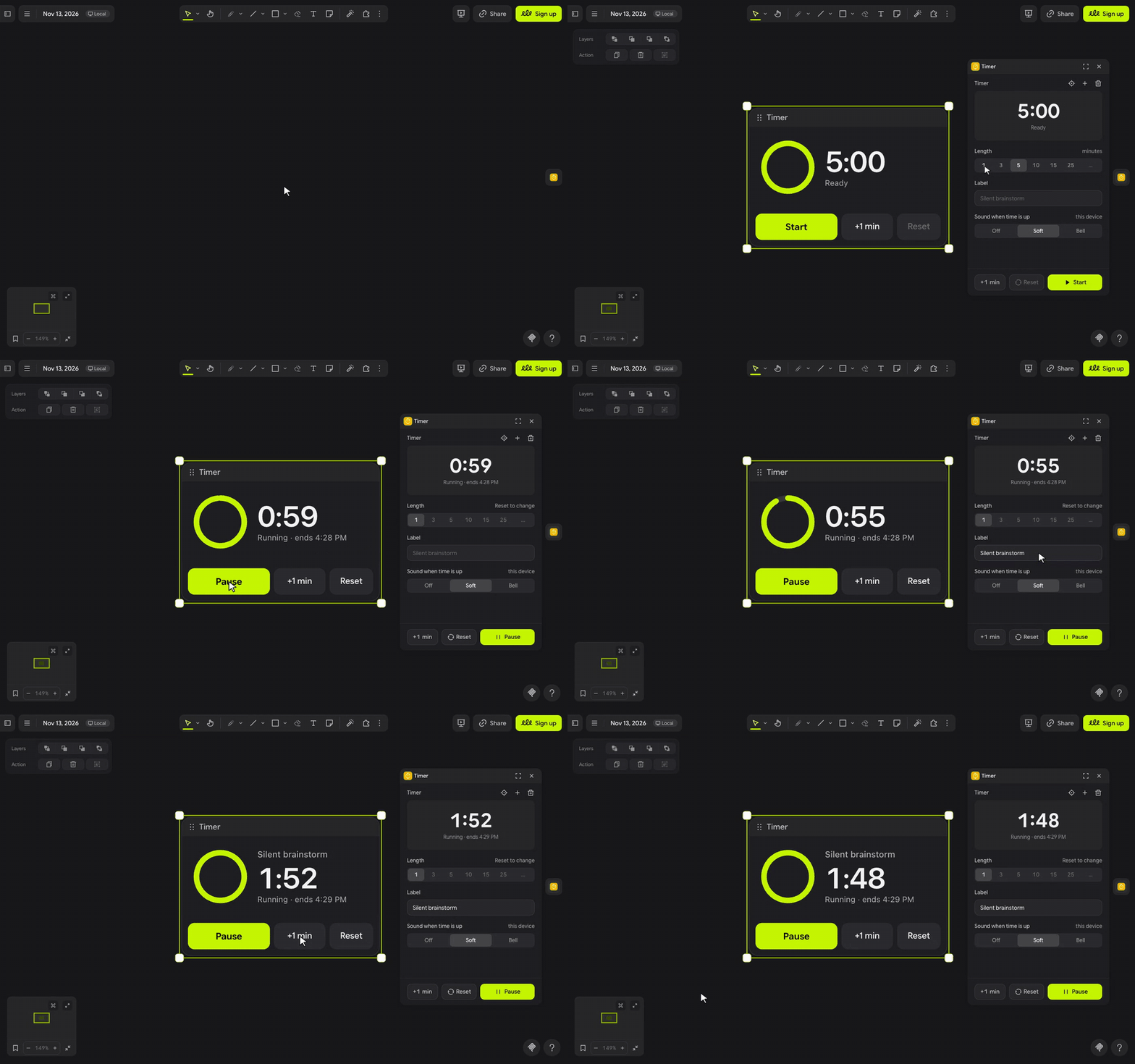
let's time it ٩(◕‿◕)۶
- Click the stopwatch in the extension rail. A timer lands in view.
- Pick a length in the panel, 1, 3, 5, 10, 15 or 25 minutes, or type any whole number up to 99 in the box beside them. Add a Label like Silent brainstorm.
- Press Start on the timer. Its digits and ring count down on every screen on the board.
- Pause, +1 min and Reset sit on the timer, in the panel, and in the right-click menu under Timer.
(・_・;) Why didn't it chime? Browsers only play sound after a click inside the panel. Press Click to enable sound once, or any button in the panel, and keep the board open in that tab.
make it yours (。•̀ᴗ-)✧
- Sound when time is up: Off, Soft or Bell, chosen on each device.
- Label: shows on the timer and on the pill, so everyone knows what the clock is for.
- Length: six presets plus your own, up to 99 minutes; +1 min keeps adding while it runs.
- Size: resize the timer like any element; it keeps its size through every press.
- More than one timer: the + in the panel adds another. Select a timer to set it up in the panel.
little things to try (っ˘ω˘ς )
- Run a 5-minute silent brainstorm in a retro, then press +1 min when the room needs one more.
- Give each person 3 minutes in a design critique: Reset, Start, next person.
- Do a 25-minute focus sprint while you draw, with Bell so you hear it from across the room.
- Put a timer in each workshop section, labelled by activity, and start each one when its turn comes.
the small print: the timer is part of the board, so everyone on it sees the same countdown, and anyone with Timer can press its buttons; people without Timer see it tick but their clicks do nothing. A press swaps the timer for a fresh copy with the new state, so undoing one takes two steps. At zero, the screen of whoever last pressed Start, Resume or +1 min, or added the timer, swaps it once more for a finished one that offers Start again, which adds two undo steps for that person; if their screen is closed, anyone else with Timer does it 5 seconds later. When the timer is off screen, a small pill at the top of your screen keeps counting. Each computer counts from its own clock, so screens can differ by a second or two. The panel's font, Google Sans Flex (OFL), loads from jsDelivr; nothing else downloads, and nothing you draw or type leaves your board. Your sound choice stays in this browser, and the chime is synthesised in it, with no audio files. Code MIT; building it yourself? See DEVELOPMENT.md.