Word Art
Make your words pop. Type up to three lines, pick a style (Retro 3D, Neon, Chrome, Outline, Bubble or Rainbow wave) and a font, set the colours, arc and size, then click Place on board to add it as a crisp transparent image. Select it later and click Edit selected to change the words in place. Made for titles, posters, invites and team shout-outs.

Word Art (ノ≧∀≦)ノ★
make your words pop.
Type a word or a short title, pick Retro 3D, Neon, Chrome or three more styles, and place it on the board as a crisp transparent image. Great for titles, invites and shout-outs, and it stays editable when the words change ✧
let's shout ٩(◕‿◕)۶
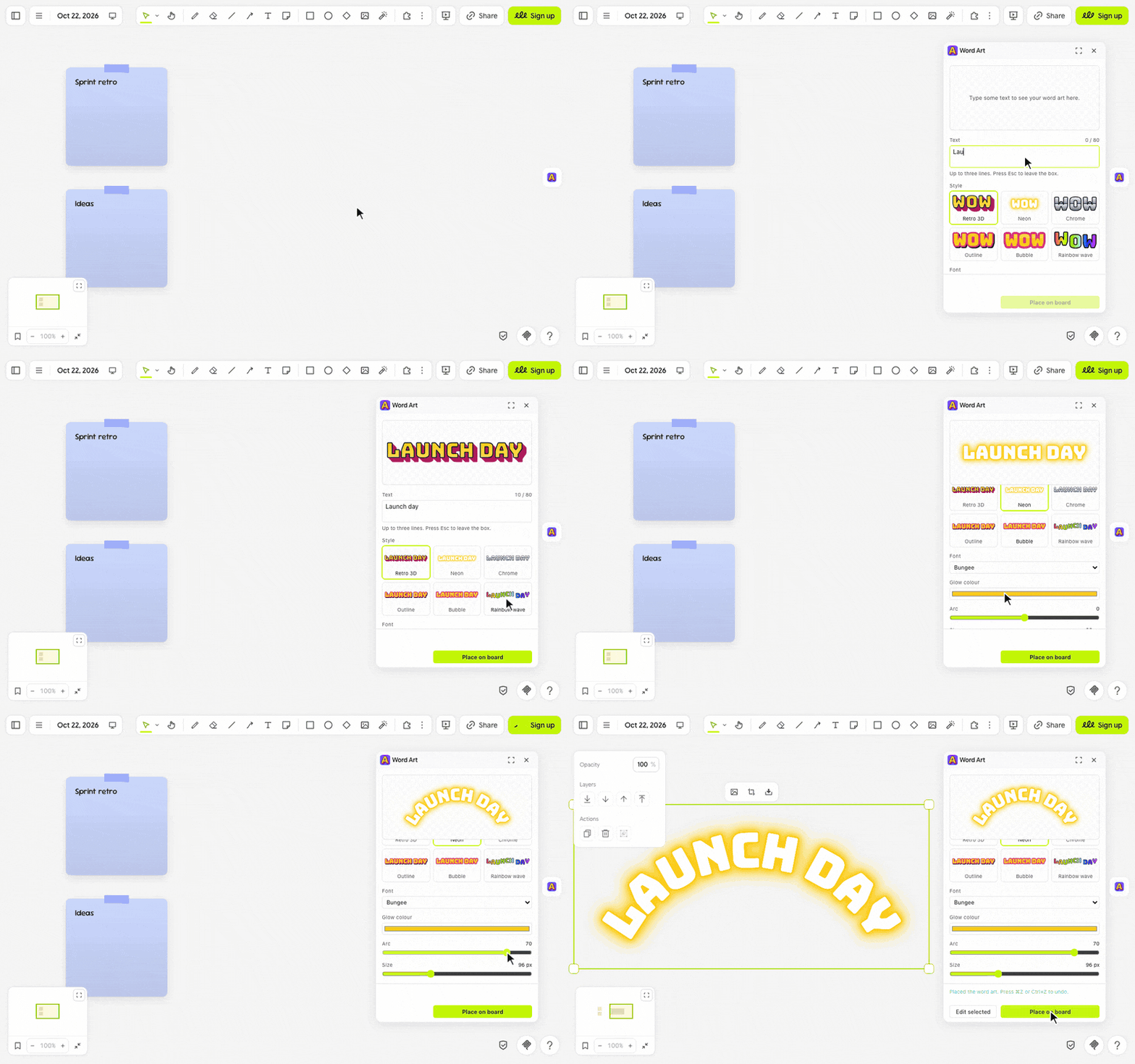
- Click the big yellow A in the extension rail.
- Type your words in Text, like Hello!, Team retro or Happy birthday, up to three lines.
- Pick a Style: each tile previews your words in that style. Click Place on board and it lands in view, beside anything already there.
- To change it later, select it, click Edit selected, make your changes and click Update. Place new makes a copy instead.
(・_・;) where did the colours go? Each style only shows the colours it paints with: Chrome and Rainbow wave have none, and Rainbow wave has no Arc either.
make it yours (。•̀ᴗ-)✧
- Style: Retro 3D, Neon, Chrome, Outline, Bubble or Rainbow wave.
- Font: Bungee, Pacifico, Righteous, Anton or Rubik Mono One.
- Colours: named for what they paint, like Face colour and Depth colour for Retro 3D or Glow colour for Neon.
- Arc: bend the words up like a rainbow or down like a smile.
- Size: 48 to 200 px.
little things to try (っ˘ω˘ς )
- A Retro 3D title arcing over your next workshop agenda.
- Neon in Pacifico for a party invite or a team shout-out.
- Bubble letters in your team colours across the top of a retro board.
- Happy birthday in Rainbow wave, with a Chrome name underneath.
the small print: the fonts download from jsDelivr as you use them; nothing you draw or type leaves your board. Your style, font, colours, arc and size stay in this browser; the words live only in the images you place. Fonts: Bungee, Pacifico, Righteous, Anton and Rubik Mono One (SIL Open Font Licence 1.1), via Fontsource. Code MIT; building it yourself? See DEVELOPMENT.md.