
It's In There!
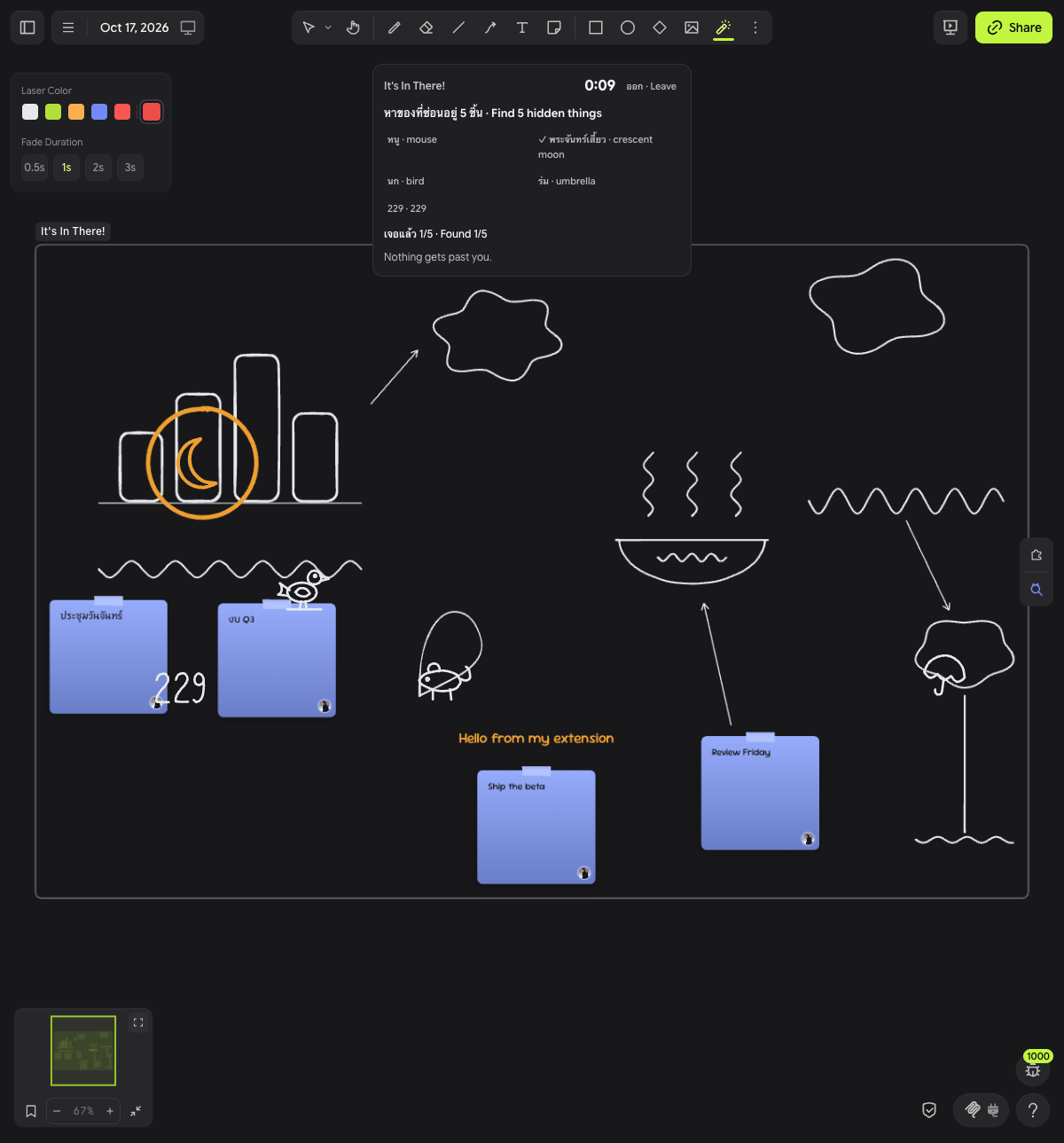
A hidden-object race on your own board. Small line drawings, such as cats and numbers, are hidden inside what your group drew, and everyone races to circle them with the laser.

It's In There!
A hidden-object race on your own Drawdy board. Line-art things are hidden inside what your group drew, and everyone races to circle them with the laser pointer.
หาของที่ซ่อนอยู่ในรูปที่เพื่อนวาด แล้ววงด้วยเลเซอร์ให้เร็วที่สุด · Find the things hidden in your drawings, and circle them with the laser first.
How to play
- Pick the area. Select some drawings, or scroll so they fill your view.
- Click the magnifier button in the board's right-hand rail. The extension wraps the area in a frame named "It's In There!" and starts a round.
- Hunt. Small line drawings, such as cats, a fish, a key, and the number 229, appear inside the frame in your board's stroke style. The banner at the top lists what to find and counts down.
- Circle each one with the laser. The extension switches to the laser for you. If you switch away, press
Kto get it back. A loop around a target or a short scribble over its centre counts. A loop around the whole frame does not. - Finish the round. A find turns the finder's colour, and a small ring marks it on the board. When time runs out, the targets nobody found blink red.
- Play again or stop. Click Next round for another round, or Stop to end the hunt. The frame and the found rings stay on the board.
Every round you clear raises the level, up to level 4. A round that times out stays at the same level.
| Level | Targets | Time |
|---|---|---|
| 1 | 3 | 60 s |
| 2 | 4 | 50 s |
| 3 | 5 | 40 s |
| 4 | 6 | 30 s |
The banner and the taunts are in Thai and English. Click the magnifier again with a hunt frame in view to rejoin that frame.
Racing each other
With two or more players in a round, the banner keeps score:
- Scoreboard. One row per player on the board in this room, plus anyone who found something this round. Each row shows the player's colour, their finds this round, and their rounds won (🏆). A 👑 marks the player who is strictly ahead. A tie has no crown.
- Got it first. Circle a target someone else already found, or lose a claim by a moment, and the banner says "Ben เจอก่อน · Ben got it first" in their colour for a couple of seconds.
- Round winner. When a round ends, the banner names the winner with the score, such as "🏆 Ben wins the round! 2–1", or calls a tie.
- Named taunts. The room calls out a change of lead ("Ben takes the lead!", "Ana ties it up!") and nudges the last-place player for a rematch. Playing alone keeps the plain lines.
Everyone tied for the most finds wins the round. A round played alone counts as a win when you found something. A cancelled round has no winner.
Install
On a local board, from source
Development links work only on local boards.
-
Run the dev server:
npm install
npm run dev
The server listens on
http://localhost:5183.vite.config.tspins that port. -
Open a local board in Drawdy.
-
Press
⌘K(Ctrl+Kon Windows or Linux) and run Add extension dev server. Enterhttp://localhost:5183and click Connect.
Drawdy reloads the extension each time you save a driver source file. A reload ends any hunt in progress.
From the packaged file
npm run build
The build writes dist/mingrath1-its-in-there.drawdyx. This zip holds manifest.json and main.js, and it is the whole extension. The Drawdy quickstart says anyone can install this file into Drawdy. It does not give the steps.
As a private extension on cloud boards
Cloud boards cannot use a dev server. To play on one, add this repository as a private extension. Drawdy builds it in your browser from GitHub, so the repository must be public on GitHub.
- Push this repository to a public GitHub repository.
- Go to Account → Extensions on drawdy.io, open the Submit tab, and choose Private.
- Paste the repository URL and click Add extension.
- On a board, open Extensions → Private and install it.
If you leave the branch empty, installed copies follow new commits on the default branch. They check at most every 6 hours. Editors of a cloud board where you install it get it too. Viewers do not.
Permissions
Drawdy asks for each permission the first time the extension needs it. Nothing is asked until you click the magnifier button. Click Allow on each prompt. Dismissing a prompt can save a Deny for that device.
| Permission | Why it needs it |
|---|---|
dom | The banner with its countdown, its list of targets, and its buttons. |
scene | Reading the drawings in the frame, drawing the targets, and adding the hunt frame and the found rings. |
collaboration | Your name and colour, for the scoreboard and for the colour of your finds. |
It never edits your drawings. The targets are preview elements on each player's screen, so they are not saved and do not sync. The only things it adds to the board are the hunt frame and one small ring per find, inside that frame.
Multiplayer
This build plays online. It connects to the room backend at https://its-in-there-room.mingrath.workers.dev, a Cloudflare Worker with one Durable Object per hunt frame. Everyone who clicks the magnifier button with the same hunt frame in view joins one room, with one set of targets and one scoreboard. The first player to circle a target gets it.
Run your own backend
-
Deploy the backend:
cd server && npm install && npx wrangler deployWrangler prints the Worker's
https://URL. -
Set
BACKEND_URLinsrc/driver/config.tsto that URL. Set it tonullto play offline, where each player's driver runs the whole game in-process withLocalHostand each player races alone. -
Rebuild with
npm run build, or let the dev server reload. For a private extension, commit and push the change. Drawdy builds from GitHub. -
Start a new hunt.
Notes:
- The backend must be on public HTTPS. The driver runs in a worker that cannot reach
localhost. - A hunt frame stores the backend URL when it is created. Frames made before you set
BACKEND_URLstay offline, so start a new frame. - The frame holds the room's join token. Anyone who can open the board can join the room.
- A room takes 32 players online at once. Another player stays on "Connecting…" and retries until a place frees.
- A room keeps up to 256 players on its scoreboard. A new player after that is told the room is full, because a scoreboard place never frees.
- When the board syncs slowly between two tabs of the same player, both tabs can write a found marker for one find, and the extra circle stays until a later room update reaches a tab that sees both.
- Known issue: the find that ends a round sometimes gets no ring. The find still counts, turns the finder's colour, and shows on the scoreboard. The cause is not known yet.
docs/qa-live6/REPORT.md(lane N5) has the live runs. - The
Roomclass uses SQLite storage. Cloudflare's Workers Free plan allows only SQLite-backed Durable Objects, so this backend fits it. Free-plan usage has daily limits, so check your plan against Durable Objects pricing.
Development
Run the tests:
npm test
cd server && npm test
npm test runs the driver and shared tests with node --test. Node runs the .ts files directly, so use a Node version with type stripping on by default. The tests last passed on Node 26. cd server && npm test runs the backend tests with Vitest in the Workers runtime. npm run typecheck checks the driver.
The repository has three parts:
src/driver/is the Drawdy driver.hunt.tshandles the button, the banner, the targets, and laser judging.local-host.tsis the offline room, andremote-host.tstalks to the backend over a WebSocket.config.tsholdsBACKEND_URL.src/shared/holds the game itself.rules.tsis the game as a pure reducer.placement.tshides the targets,judge.tsdecides whether a laser stroke found one,standings.tsdecides who leads and who won a round,taunts.tspicks the host's lines, andprotocol.tsdefines the messages between driver and room.server/is the Worker and theRoomDurable Object inserver/src/room.ts.
The rules run in both places from one copy. LocalHost and the Room Durable Object both import src/shared/rules.ts, so offline play and online play follow the same rules. Drawdy bundles src/index.ts with esbuild and allows no npm imports, so the shared code has no dependencies.
To race yourself on one machine, run the test bot as a second player. Two tabs of one Drawdy user count as one player, so a rival needs its own connection. The bot joins a hunt frame's room by its join token and claims targets on a timer. It never starts or cancels a round.
node scripts/bot-player.mjs --token <the frame's 64-hex join token> --name Ben --first 10 --every 12 --max 2
scripts/race-check.mjs plays two rounds between a scripted player and the bot against a backend and checks the named taunts, the winner, and rounds won. Its last runs are in docs/e2e-compete-local.txt and docs/e2e-compete-prod.txt.
docs/design/ holds the protocol design arena. gpt.md, grok.md, gemini.md, and muse.md are four proposals, and JUDGE.md compares them. The top comment in src/shared/protocol.ts says which parts each one contributed. docs/FACTS.md lists the platform facts the design relies on.
Credits
- The backend started as a copy of earendil-works/pi-durable-cloudflare at commit
dcb56ce, under the MIT License. Seeserver/LICENSEandserver/NOTICE. - The stamps in
src/stamp-pack.tsare placeholder line art. They should be replaced with human-drawn stamps.docs/stamp-sheet.pngshows them all.
License
MIT. See LICENSE. The backend in server/ keeps its own MIT license and notice (see Credits).