Selecting things on a board sounds like it should be the most boring feature in the app. You drag a box, stuff gets selected, you move on. And for a long time that's all Drawdy had — a rectangular marquee. It works just fine, but it has one blind spot. A rectangle can only grab things that happen to line up in a neat little grid. Real boards don't do that. Get a live session going, with everyone's boxes and arrows flying everywhere, and the rectangle starts grabbing things you didn't want and missing the things you did.
So we added a lasso tool. You hold down, scribble a loop around whatever you care about, let go, and only those things get selected immediately. Under the hood, though, there's a fun challenge in making that lasso feeling happen without the canvas stuttering. This post walks through how it actually works — the path you draw, how we figure out what's inside it, and the tricks that keep it fast on a busy board.
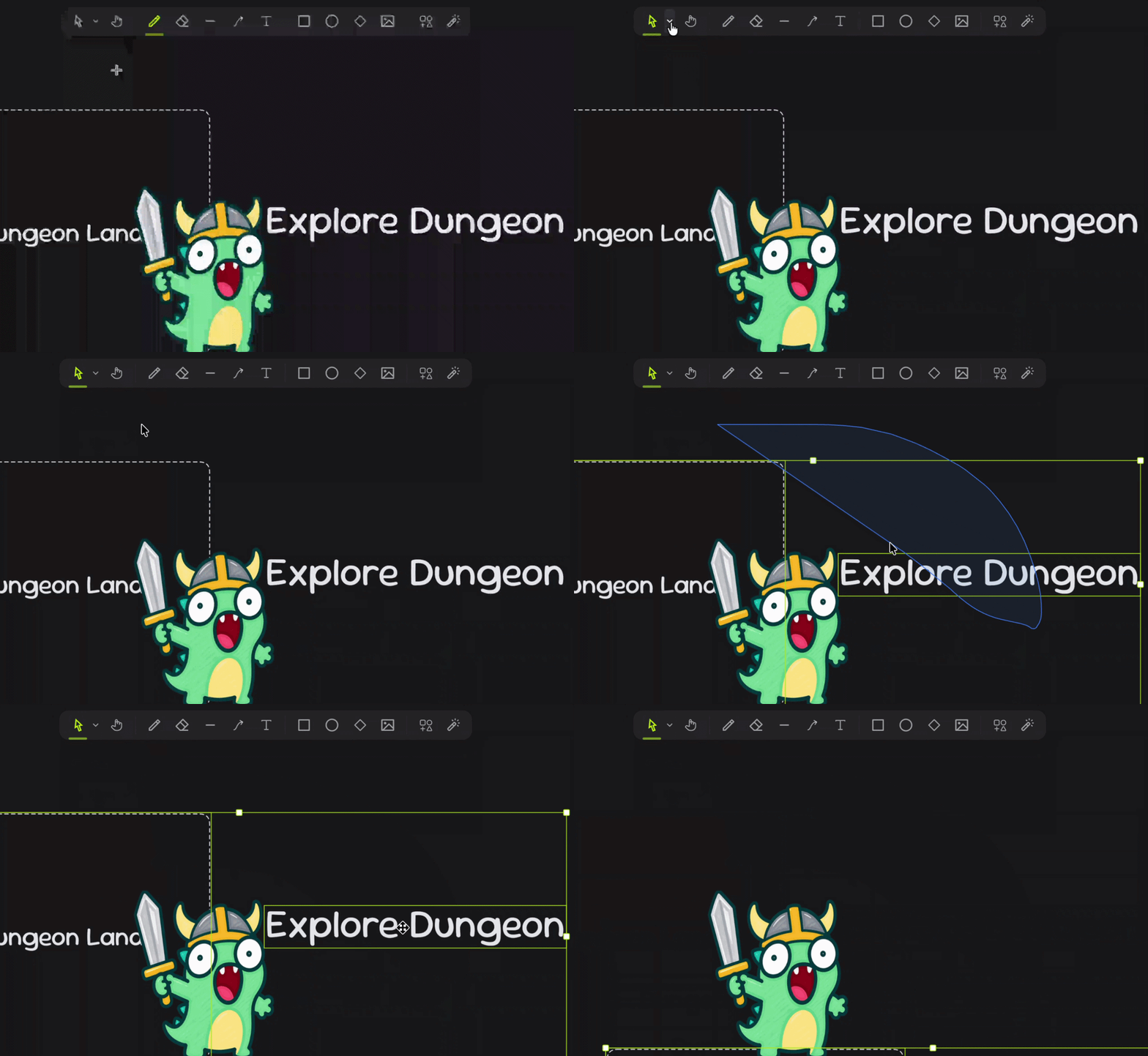
One pass around the cluster, and everything the loop touched comes with it.
One tool, two modes
The first decision we made was not to build a whole new tool. Drawing a box and drawing a loop are really the same gesture — press, drag, release — they just differ in what happens in the middle. So the lasso lives inside our existing select tool as a second mode, and a little dropdown in the toolbar flips between "Box" and "Lasso":
public get selectionMode(): SelectionMode {
    return this.settings.selectionMode ?? "rectangle";
}
The default is rectangle, so if you never touch the setting you get the classic box and nobody's muscle memory breaks. Either way, the moment you start dragging, the tool moves from its idle state into a selecting state, and that's where the whole lasso story plays out.
While you drag, we collect the points your cursor passes through. That list of points is the lasso — it's the polygon we'll test everything against later. The naive approach is to record a point on every mouse move. Don't do this. A slow, careful drag fires dozens of events over just a few pixels, and you end up with hundreds of near-identical points stacked on top of each other. So we only keep a point once it's moved a small step away from the last one. The test is the plain straight-line distance:
√((x₂ − x₁)² + (y₂ − y₁)²) ≥ 2
In code that's a single distance check before we push the point:
private appendLassoPoint(existing: Point2D[] | null, point: Point2D): Point2D[] {
    const points = existing ? [...existing] : [];
    const last = points[points.length - 1];
    if (
        !last ||
        Math.hypot(point[0] - last[0], point[1] - last[1]) >= LASSO_MIN_STEP
    ) {
        points.push(point);
    }
    return points;
}
The threshold is two world units. Tiny, but it's the difference between a lasso made of a clean ~40 points and one bloated with 400. We're thinning the line as you draw it, not after. One more thing worth noting: the points live in world space, not screen space. That way the math downstream never cares where the camera happens to be.
Working out what's inside
You've drawn a loop. Now, which shapes did you actually catch? We answer that live, on every move, so the selection updates as you drag instead of snapping in when you release. That means the question has to be answered fast — potentially many times a second. The whole thing reads top to bottom like this:
private selectInLasso(lassoPoints: Point2D[], baseIds: string[]): string[] {
    const rawIds: string[] = [...baseIds];
    if (lassoPoints.length >= 3) {
        const bounds = Polyline.bounds(lassoPoints);
        const elements = this.tool.spatialRegistry.query(bounds);
        const resolve = this.tool.animation.resolver();
        for (const queried of elements) {
            const element = this.tool.scene.getElement(queried.id) ?? queried;
            if (element.locked) continue;
            if (elementInLasso(element, lassoPoints, resolve(element))) {
                rawIds.push(element.id);
            }
        }
    }
    return expandGroupSelection(
        Array.from(new Set(rawIds)),
        this.tool.scene,
        this.tool.editingGroupId
    );
}
The important part is that we don't test every shape on the board. A thousand elements, checked on every frame? No thanks. Instead we ask a quadtree — a spatial index that roughly knows where everything lives — for only the elements near the lasso's bounding box. That narrows a thousand candidates down to a handful. Everything else is culled before we do any real geometry.
For each candidate that survives, we ask a deceptively simple question: is this shape caught by the loop? The answer comes in two parts.
export function elementInLasso(
    element: Element,
    polygon: Polygon,
    animation?: ResolvedLocalAnimation | null
): boolean {
    if (polygon.length < 3) return false;
    if (animation) {
        const inv = Element.animationInverse(element, animation);
        if (!inv) return false;
        polygon = Affine2x3.applyAffine(inv, polygon);
    }

    const rect = Element.computeRect(element);
    if (!rect) return false;

    const corners: Point2D[] = [
        [rect.x, rect.y],
        [rect.x + rect.width, rect.y],
        [rect.x + rect.width, rect.y + rect.height],
        [rect.x, rect.y + rect.height],
    ];

    // Fully enclosed — every corner lies inside the lasso.
    if (corners.every((corner) => Polygon.contains(polygon, corner))) {
        return true;
    }
    // Crossing — the lasso outline cuts through the element's bounds.
    return Polygon.intersectsRect(polygon, rect);
}
A shape counts in two cases. Either it's fully enclosed, with all four corners of its box inside your loop, or it's crossing, where your loop's outline slices through the box. That second rule is a deliberate feel choice. We could have demanded that you completely enclose something, but in practice that's fussy — you'd constantly clip the edge of a note and have to redo the loop. Letting a shape count when the lasso merely touches it makes the tool forgiving in the way people actually expect. Graze it and it's yours.
Both of those checks come down to two classic bits of geometry. Deciding whether a corner is inside the loop is done with ray casting: shoot a horizontal ray out from the point and count how many times it crosses the edges of the polygon. An odd number of crossings means you're inside, an even number means you're outside. For an edge running from (xᵢ, yᵢ) to (xⱼ, yⱼ), the ray crosses it when the point's height sits between the two endpoints and the crossing happens to the right of the point:
x < (xⱼ − xᵢ)(y − yᵢ) / (yⱼ − yᵢ) + xᵢ
which is a single loop that walks the edges and flips an "inside" flag on each crossing:
contains(polygon: Polygon, point: Point2D): boolean {
    if (polygon.length < 3) return false;
    let inside = false;
    for (let i = 0, j = polygon.length - 1; i < polygon.length; j = i++) {
        const xi = polygon[i][0], yi = polygon[i][1];
        const xj = polygon[j][0], yj = polygon[j][1];
        const intersect =
            yi > point[1] !== yj > point[1] &&
            point[0] < ((xj - xi) * (point[1] - yi)) / (yj - yi) + xi;
        if (intersect) inside = !inside;
    }
    return inside;
}
The crossing check is the fallback for shapes you only partially surrounded. We walk every edge of the lasso against the four edges of the shape's box, looking for an intersection. There's a cheap early check first — if a lasso point already sits inside the box, we skip the edge-by-edge test entirely.
One nice side effect of all this: you never have to actually finish your loop. Scribble most of a circle, release halfway back, and it still works. We never require the path to be closed in the data; the geometry closes it for you. The point-in-polygon test wraps from the last point back to the first on its own, and the crossing test tacks the starting point onto the end before it runs. The loop is always "closed enough" without asking you to be precise about it.
Here's all of that running live — the same distance-step point collection, the same two-tier test. Loop some shapes, graze others, and don't bother closing the loop:
Solid lime means fully enclosed; dashed means the lasso only crossed it. Both count.
Making it feel right
None of the above matters if you can't see what you're doing. So as soon as your path has a couple of points, we draw it: a translucent blue fill with a solid blue outline. Joins and caps are rounded, so it reads like ink rather than a jagged polygon.
ctx.strokeStyle = "#3b82f6";
ctx.fillStyle = "rgba(59, 130, 246, 0.1)";
ctx.lineWidth = 2 / zoom;
ctx.lineJoin = "round";
ctx.lineCap = "round";
The detail hiding in there is the 2 / zoom on the line width. Because our points live in world space, a fixed width would look thick when you zoom in and hair-thin when you zoom out. Dividing by the zoom level cancels that out, so the outline stays a constant thickness on screen no matter how far in or out you are.
The rest is the small stuff that separates a tool that works from one that feels finished. Press and release without really moving? That's a click on a single shape, not a zero-size lasso — a twitchy hand doesn't cost you. Catching one member of a group pulls in the whole group. And anything locked is skipped before we even run the geometry, so you can lasso freely over a locked background without disturbing it.
You may have noticed the tests above run against each shape's bounding box, not its true outline. That's on purpose: box math is cheap enough to run on every single move, and for most shapes the box is the shape, near enough. A thin diagonal line is the one case where the box is roomier than the ink — and we'd rather the lasso be a touch generous there than make you wait for pixel-perfect geometry.
That's the lasso: a scribble, a quadtree to narrow things down, and a bit of ray casting to decide what's inside. None of the pieces are exotic on their own. Most of the work went into the small decisions about how forgiving it should feel — so that in the end, it just does what you'd expect when you draw a circle around your stuff.