Comparison
Excalidraw vs tldraw
Both are free whiteboards in a browser tab, both draw with a hand-drawn line, and both are loved by developers. The real difference is the licence: Excalidraw is MIT all the way down, while tldraw is a commercial canvas SDK with a free app on top.
Reviewed · written by the team behind Drawdy, which competes with both
The short answer
Choose Excalidraw to draw, share and embed with no licence to think about, and tldraw when a canvas is the core of a product you are building and you are ready to pay for it. As apps both are free; the bill only arrives when you ship tldraw's SDK.
Pick Excalidraw when…
You want a whiteboard to use today, live sessions that are end-to-end encrypted with nobody signing in, or an embeddable editor under the MIT licence that costs nothing in production.
Pick tldraw when…
You are building a product around the canvas and need custom shapes, tools and bindings, a multiplayer sync engine and starter kits for AI agents, and a licence key and a sales conversation are acceptable.
Before you commit
- tldraw's SDK licence permits use only in development by default. Production needs a licence key: a 100-day trial, a commercial licence priced through sales, or a discretionary hobby licence for non-commercial work that shows the “made with tldraw” watermark. Several comparison pages still quote fixed prices tldraw no longer publishes.
- On tldraw.com you can draw without an account, but sharing a live board asks you to sign in first. Excalidraw starts an encrypted live session from the free app with no account on either side.
- Excalidraw's free app keeps one saved scene and a limited allowance of its generative AI. Unlimited scenes, cloud saves, comments, presentations and extended AI are Excalidraw Plus at $6 per user per month.
Where each one shines
Excalidraw
Excalidraw is the whiteboard most people picture when they hear hand-drawn diagrams. The free app at excalidraw.com is the full editor with no account, live sessions are end-to-end encrypted in your browser, and drawings autosave locally.
It is MIT licensed, and the same editor ships as the @excalidraw/excalidraw package, so embedding it in a commercial product costs nothing and needs no key. Around it sits the biggest community in the category: 133,000 GitHub stars, thousands of shared libraries, a VS Code extension and an Obsidian plugin.
Its limits sit in the free app rather than the licence. One saved scene is free; unlimited scenes, cloud saves, comments, presentations and extended AI are Excalidraw Plus.
tldraw
tldraw is the best-engineered canvas on the web, and tldraw.com is its free showcase. You draw without an account, with sticky notes, a comment tool and export to PNG or SVG, and the interaction polish is what the rest of the category is measured against.
Its real product is the SDK. tldraw is built to be embedded: custom shapes, tools and bindings, a multiplayer sync engine that comes with the licence and that you host yourself in production, and starter kits that include one for building an AI agent on the canvas.
The code is public on GitHub, with 50,600 stars, but it is not open source. tldraw's own licence page calls the SDK source available and not permissively licensed, and it will not run in production without a licence key.
The same diagram in both
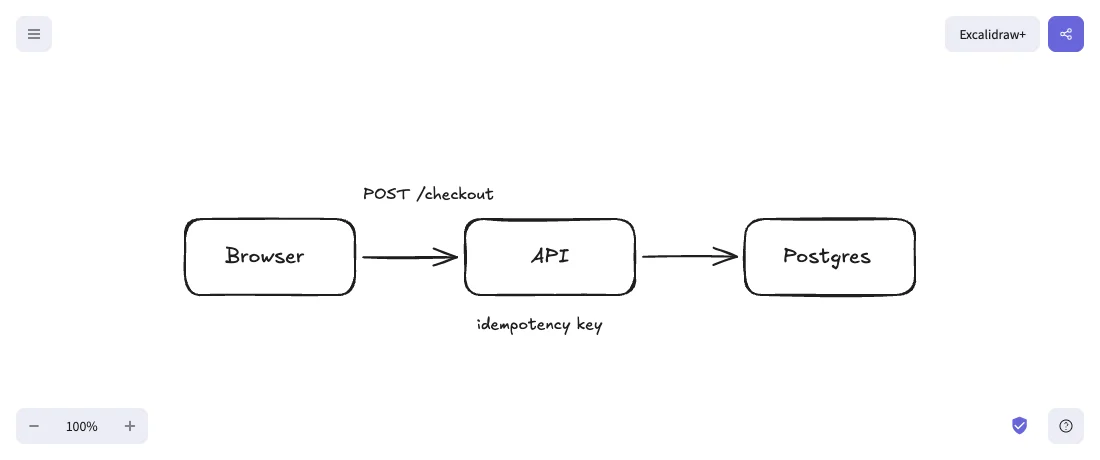
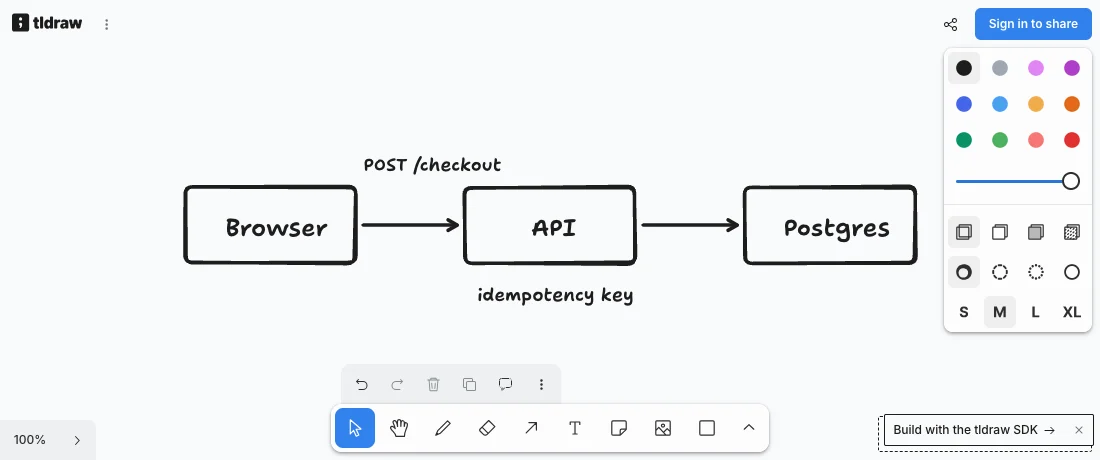
We copied one small checkout diagram, three boxes, two arrows and two labels, out of Excalidraw and pasted it into both live apps, then took a screenshot of each with nothing retouched. Both keep the hand-drawn line; tldraw redraws the shapes in its own heavier stroke and font.
Feature by feature
| Feature | Excalidraw | tldraw |
|---|---|---|
| Free web app, no account to start drawing | Yes | Yes |
| Hand-drawn line as the defaulttldraw's default stroke is its draw style, which you can switch to solid, dashed or dotted | Yes | Yes |
| Share a live board without signing intldraw.com asks you to sign in before it shares a board | Yes | No |
| End-to-end encrypted live collaborationtldraw does not advertise end-to-end encryption on the pages we checked | Yes | No |
| Comments on the boardtldraw.com has a comment tool in its toolbar; Excalidraw keeps comments for Plus | Paid plan only | Yes |
| Presentation modeExcalidraw's presentations are a Plus feature; tldraw.com's menus had none in September 2026 | Paid plan only | No |
| Export to PNG and SVGExcalidraw adds its own .excalidraw file; tldraw.com can also download the board as a file | Yes | Yes |
| Embed the canvas in your own product@excalidraw/excalidraw on npm; the SDK is tldraw's main product | Yes | Yes |
| Free to ship in a commercial productExcalidraw is MIT; tldraw needs a commercial licence key in production | Yes | No |
| Custom shapes, tools and bindings in an embedded canvasExcalidraw's package is a finished editor configured through props and an API; tldraw's SDK is built around your own shapes and tools | No | Yes |
| Starter kits for building AI agents on the canvasExcalidraw's AI lives in its app, limited on free and extended on Plus | No | Yes |
| Published price for commercial useExcalidraw Plus is $6 per user per month; tldraw's SDK has value-based pricing through sales | Yes | No |
| Open-source licenceExcalidraw is MIT; tldraw's own licence page calls the SDK source available, not open source | Yes | No |
| GitHub starsRead from each repository on 28 September 2026 | 133k | 50.6k |
| Sketched-shape recognitionNeither turns a freehand stroke into a clean shape | No | No |
Which one should you pick?
Choose Excalidraw if…
- You want a free whiteboard today and never want to think about a licence key.
- Live sessions should be end-to-end encrypted, and nobody in them should need an account.
- You are embedding a canvas in a commercial product and want MIT terms with no production fee.
- You lean on the ecosystem: community libraries, the VS Code extension, the Obsidian plugin.
- You would rather pay $6 per user per month for cloud scenes than negotiate a licence.
Choose tldraw if…
- A canvas is the core of the product you are building, and you need your own shapes, tools and bindings rather than props on a finished editor.
- You want a multiplayer sync engine and an AI agent starter kit that already fit the SDK.
- Your company can budget for a commercial licence and would rather have support than fork an editor.
- The project is non-commercial and a “made with tldraw” watermark under a hobby licence is fine.
- You like tldraw.com's feel for quick sketches and want comments without a subscription.
What each one costs
Excalidraw
The app at excalidraw.com is free forever: the full editor, one scene, unlimited collaborators, libraries, and export to PNG, SVG or file, encrypted end to end in your browser. Embedding the MIT-licensed package in any product costs nothing.
Excalidraw Plus is $6 per user per month, 14% less billed yearly, with a 14-day trial. It adds unlimited scenes and folders, cloud saves, sharing rights, comments, presentations, voice and screensharing, and extended AI.
tldraw
tldraw.com is free to use, and tldraw's pricing page sells the SDK rather than a plan for the app.
The SDK needs a licence key in production. The trial runs 100 days with no credit card, the commercial licence has value-based pricing through sales with startup discounts, and the hobby licence is free for non-commercial projects at tldraw's discretion, with the watermark on the canvas.
Full disclosure
Where we fit, and where we do not
We build Drawdy, a browser whiteboard in the same hand-drawn family as both of these, so read this knowing we have a side. If what sent you here is that Excalidraw keeps version history and presentations for Plus, Drawdy puts both in the free tier, along with shape recognition that turns a rough rectangle into a clean one.
Boards live on your device and are unlimited, the free plan adds three cloud boards, share links are end-to-end encrypted, and guests join from a link without an account. Extensions run inside the canvas from the marketplace at drawdy.io/extensions, such as Serene, which plays your drawing back as music, and the same API is open for building your own.
It is not the answer if you came for either tool as a component. Drawdy has no SDK and no embeddable package, so if the canvas has to live inside your product, the two tools on this page are the ones to compare. Drawdy also cannot open a saved .excalidraw or .tldr file yet, though elements pasted out of Excalidraw arrive as editable objects.
FAQ
Questions people actually ask
Is tldraw free?+
The app at tldraw.com is free, and you can draw without an account; sharing a live board asks you to sign in. The SDK is different: its licence permits use only in development by default, and production needs a licence key, which is a 100-day trial, a commercial licence priced through sales, or a hobby licence for non-commercial projects that shows the “made with tldraw” watermark.
Is tldraw open source?+
No, although its code is public. tldraw's own licence page describes the SDK as source available and not permissively licensed, and says it would not be open source by any definition. You can read and build with it in development, and it needs a valid licence key to run in production. Excalidraw is MIT licensed, so embedding it in a commercial product needs no key and no fee.
Which is better for embedding a whiteboard in my app?+
tldraw, if the canvas is the product and you will pay for it: the SDK is built around custom shapes, tools and bindings, with a multiplayer sync engine you host yourself and starter kits for AI agents. Excalidraw, if you want a finished editor as a component under MIT terms: the @excalidraw/excalidraw package drops in with no licence key, though it bends less when you need shapes of your own.
Which one is more private?+
Excalidraw, on what each vendor publishes. Its live sessions are end-to-end encrypted in the browser and drawings autosave locally, with no account involved. tldraw does not advertise end-to-end encryption, and sharing from tldraw.com needs an account. If a board holds anything sensitive, Excalidraw's model, or a copy you host yourself, is the safer default.
Can I move a drawing from Excalidraw to tldraw?+
Yes, by copy and paste. We copied a small Excalidraw diagram and pasted it into tldraw.com in September 2026, and the boxes, arrows and labels arrived as editable tldraw shapes. Opening a saved .excalidraw file in tldraw is a different matter, and the reverse direction has no equivalent, so pick the tool you expect to keep the drawing in.
Sources
Every claim about Excalidraw and tldraw on this page was checked against their own pages in .
Keep reading

The canvas is open
Start drawing now
Sketch a system, map a flow, or think it through with your team — no signup, no setup, just a canvas and a link to share.
Start drawing — it’s free