Comparison
Excalidraw vs draw.io
Both are open source, both are free, and both put an infinite canvas in a browser tab. They are still built for different jobs: one is a sketchpad for thinking out loud, the other is a diagram editor with the shape libraries a network engineer expects.
Reviewed · written by the team behind Drawdy, which competes with both
Feature by feature
| Feature | Excalidraw | draw.io |
|---|---|---|
| Your AI draws on your boards (MCP)Excalidraw's free MCP app draws inside the chat, and Excalidraw+ edits saved workspace scenes; draw.io's free official MCP server draws in the chat or a new editor tab and can edit a .drawio file on your disk, but does not save into Drive or Confluence files | Paid plan only | Local files |
| Extensions run on the boardExcalidraw offers shape libraries, not extensions; draw.io's web editor loads plugins only from a built-in list, and its desktop app dropped them in v31.1.5 | No | Built-in list |
| Free to use | Yes | Yes |
| No account needed to start | Yes | Yes |
| Hand-drawn look as the defaultdraw.io has a sketch style you switch on; in Excalidraw the hand-drawn feel is the whole point | Yes | No |
| Open source and self-hostabledraw.io is Apache 2.0 with an official Docker image; Excalidraw's source is public and self-hostable too | Yes | Yes |
| Unlimited saved boards or diagramsExcalidraw's comparison table lists unlimited scenes under Plus; draw.io has no cap because the files are yours | Paid plan only | Yes |
| Real-time collaboration built into the editordrawio.com markets real-time collaboration with shared cursors, and its docs describe live co-editing for files in Google Drive, OneDrive, Confluence Cloud or Nextcloud, while the jgraph/drawio repository states it does not support real-time collaborative editing in this version | Yes | On Drive, OneDrive, Confluence |
| Technical shape libraries: UML, ERD, network, rackExcalidraw has community libraries rather than formal diagram stencils | No | Yes |
| Community shape libraries, VS Code and Obsidian pluginsdraw.io's docs point to public custom shape libraries and a third-party VS Code extension, but list no Obsidian plugin | Yes | Partly |
| Diagrams inside Confluence and Jira pagesThis is draw.io's commercial product, sold through the Atlassian Marketplace; Excalidraw does not publish a Confluence or Jira app | No | Yes |
| Offline desktop app for Windows, macOS and LinuxExcalidraw runs in the browser and works offline there | No | Yes |
| Files kept in your own Drive, OneDrive, GitHub, or on diskExcalidraw's free app keeps drawings in your browser and does not publish storage-provider integrations | No | Yes |
| Version historydraw.io holds no files of its own, so history is whatever Drive, Confluence or Git gives you; Excalidraw lists versioning as in progress on its roadmap | No | Via storage |
| Presentation modeExcalidraw's presentation export to PDF or PPTX is a Plus feature | Paid plan only | Yes |
| End-to-end encrypted share linksdraw.io never hosts your files, which is a strong privacy answer of a different kind; sharing security is your storage provider's, not theirs | Yes | No |
| Sketched-shape recognitionExcalidraw's Draw to shape tool reads a freehand stroke and hands back a clean shape; draw.io's sketch style restyles shapes you place | Yes | No |
| Export to PNG and SVGExcalidraw adds its own .excalidraw JSON; draw.io adds JPEG, WebP, animated GIF, PDF, HTML and .drawio XML | Yes | Yes |
The short answer
Choose draw.io when the output is a diagram somebody else has to maintain, and Excalidraw when the output is thinking. Both are free and open source, so the decision is about the job, not the bill.
Pick Excalidraw when…
You are sketching to think, you want the hand-drawn look without switching a style on, and live collaboration that is end-to-end encrypted matters more than formal stencils.
Pick draw.io when…
The diagram is UML, an entity-relationship model, a network or rack layout, an org chart or a floorplan, and the file should live in your own Drive, GitHub or on disk.
Before you commit
- draw.io's two vendor sources disagree about live co-editing. drawio.com markets real-time collaboration with shared cursors, while the jgraph/drawio README says, word for word, “draw.io does not support real-time collaborative editing in this version, currently.” If live co-editing is the requirement, test it before you commit a team.
- Excalidraw's free app keeps one saved scene and a limited allowance of its generative AI. Unlimited scenes, cloud boards, presentation export and extended AI are Excalidraw Plus at $7 per user per month ($6 billed yearly).
Where each one shines
Excalidraw
Excalidraw is the reason the hand-drawn whiteboard category exists. The free app at excalidraw.com is the full editor with no account, live-collaboration sessions are end-to-end encrypted, it works offline in the browser, and the source is public and self-hostable.
The ecosystem around it is the real moat: hundreds of community shape libraries, a VS Code extension, and an Obsidian plugin.
Its limits are commercial rather than technical. Excalidraw's own comparison table puts unlimited scenes under Plus, alongside cloud boards, comments and presentation export, at $7 per user per month ($6 billed yearly). Drawings in the free app live in your browser rather than on a server.
draw.io
draw.io, also known as diagrams.net, makes a promise almost nobody else makes and then keeps it. The editor is free forever under the Apache 2.0 licence, takes no account and no card, and the project's line on storage is hard to improve on: store your data wherever you want, we cannot access it, ever. Files go to Google Drive, OneDrive, GitHub or GitLab, your browser, or straight to disk.
For technical diagramming it is deeper than anything in the sketching family: UML, entity-relationship models, network infrastructure, rack and circuit diagrams, org charts, floorplans, attack trees and dependency graphs, with the libraries to match.
It ships an offline desktop app for Windows, macOS and Linux, self-hosts from an official Docker image, embeds inside your own application, and its Confluence and Jira apps are the reason many teams have it at all.
The same diagram in both
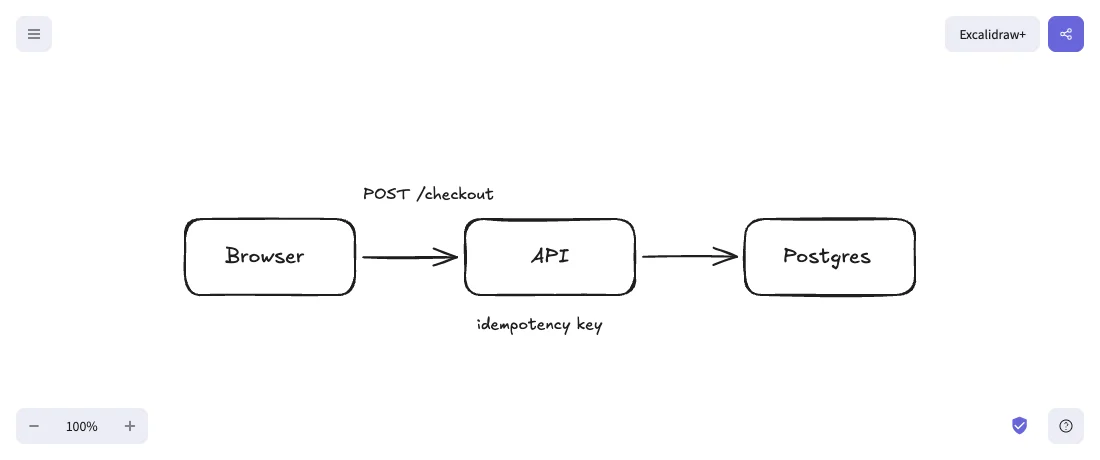
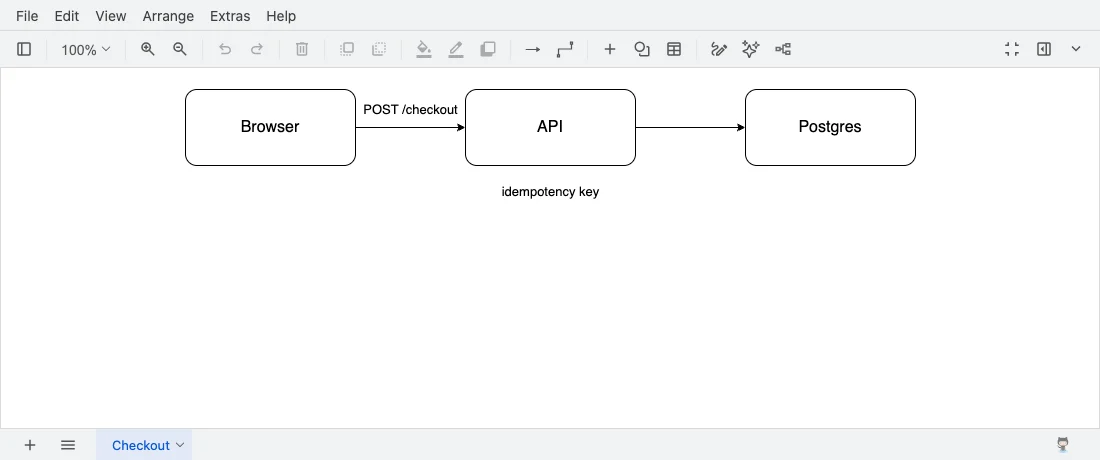
We loaded one small checkout diagram, three boxes, two arrows and two labels, into each live app with its default styles and took a screenshot, with nothing retouched. Excalidraw draws it rough without being asked. draw.io draws the same boxes as clean rounded rectangles, and its sketch style is something you switch on.
Which one should you pick?
Choose Excalidraw if…
- You are sketching to think, and you want the rough hand-drawn look without turning a style on first.
- You want live collaboration inside the editor, end-to-end encrypted, with no storage provider in the loop.
- You lean on the ecosystem: hundreds of community shape libraries, the VS Code extension, the Obsidian plugin.
- You want an open-source canvas you can fork or embed and still get the hand-drawn feel people recognise.
- You work one board at a time in your browser, so the Plus paywall never comes up.
Choose draw.io if…
- The output is a formal diagram: UML, entity-relationship models, network topology, rack layouts, org charts or floorplans.
- You want the files in your own Google Drive, OneDrive, GitHub or on disk, with the vendor unable to read them at all.
- You need to keep many saved diagrams without paying, which Excalidraw's free app does not cover.
- You need an offline desktop app for Windows, macOS or Linux, or a self-hosted editor from the official Docker image.
- Your team works in Confluence or Jira and you want the diagram living inside the page.
What each one costs
Excalidraw
The open-source app at excalidraw.com is free, with drawings kept in your browser.
Excalidraw Plus is $7 per user per month billed monthly, or $6 billed yearly, with a 14-day trial. That is what unlocks unlimited scenes, cloud boards, workspaces, comments, voice and screensharing, extended AI, and presentation export to PDF or PPTX.
draw.io
The editor is free forever, with no account and no card, under the Apache 2.0 licence, and the hosted app has no paid tier; only teams that host it themselves in production are pointed to a paid version. Nothing in the editor is held back, and draw.io does not host your files, so store your data wherever you want and they cannot access it.
The other commercial product is the Atlassian side, draw.io for Confluence and Jira, billed through the Atlassian Marketplace; a Confluence Cloud licence also covers Jira Cloud at no extra cost. draw.io does not publish those prices on its own site, so get a quote from the Marketplace.
Full disclosure
Where we fit, and where we do not
We build Drawdy, a free whiteboard where people and AI draw together, in the same hand-drawn family as Excalidraw, so read this paragraph knowing we have a side. If what sent you to this comparison is that Excalidraw keeps presentation mode for Plus and has no version history, Drawdy puts both in the free tier.
It adds shape recognition that turns a rough rectangle into a clean one, unlimited boards on your device plus three cloud boards, and snapshot links that are end-to-end encrypted. There is no account needed to start, real-time collaboration is built into the editor with guests joining from a link, and boards export to PNG, SVG or open .drawdy JSON. Your own AI can draw on your cloud boards too: connect it over MCP.
It is not the answer if you came here for draw.io's formal stencils, because Drawdy has no UML, entity-relationship or network shape libraries at all, and it is not the answer if you want Excalidraw's open source, its SDK, or a plugin ecosystem its size: Drawdy is not open source, has no SDK, and its extension marketplace is far smaller. Drawdy also cannot save back to a .excalidraw file, though it opens saved ones and elements pasted out of Excalidraw arrive as editable objects. If either of those is your requirement, the two tools on this page beat us.
FAQ
Questions people actually ask
Is Excalidraw or draw.io better for UML and network diagrams?+
draw.io, and it is not a close call. It ships shape libraries for UML, entity-relationship models, network infrastructure, rack and circuit diagrams, org charts, floorplans, attack trees and dependency graphs, all in the free editor. Excalidraw has community libraries rather than formal stencils, so a UML diagram there is shapes you assemble and label yourself. If the diagram has to be read and maintained by other engineers, use draw.io.
Does draw.io have real-time collaboration?+
draw.io's own two sources disagree, so treat live co-editing as something to verify yourself. The drawio.com site lists real-time collaboration and describes working together with shared cursors, while the jgraph/drawio repository states that draw.io does not support real-time collaborative editing in this version. What the feature documentation describes is live co-editing with shared cursors when the file is kept in Google Drive, OneDrive, Confluence Cloud or Nextcloud. Excalidraw's position needs no interpretation, because live sessions are built into the free app and end-to-end encrypted.
Are Excalidraw and draw.io both free?+
Both are free, but only draw.io is free with nothing held back. The draw.io editor is free forever under Apache 2.0, needs no sign-up and no card, and has no board cap; what it sells is a production version for teams that host it themselves and the Confluence and Jira integration through the Atlassian Marketplace. Excalidraw's free app is the full editor with encrypted live collaboration, but unlimited scenes, cloud boards and presentation export need Excalidraw Plus at $7 per user per month ($6 billed yearly).
Can I open an Excalidraw drawing in draw.io, or the other way round?+
Not as editable elements. Neither project publishes an import path for the other's file format, so an .excalidraw file has no route into draw.io and a .drawio XML file has no route into Excalidraw. Both export PNG and SVG, which means the picture travels and the ability to edit it does not. Pick the tool you expect to keep the diagram in.
Which one should a software team standardise on?+
Most teams end up running both, and that is a reasonable outcome rather than a failure to decide. draw.io is where the architecture, network and data-model diagrams live, especially if your documentation is in Confluence, because they stay accurate for years and cost nothing. Excalidraw is where the sketching happens: a design discussion, a pull-request explanation, a whiteboard session two people draw on together. The one thing worth deciding deliberately is storage, since draw.io puts the files in your own Drive or repository while Excalidraw keeps them in the browser until somebody pays for Plus.
Sources
Every claim about Excalidraw and draw.io on this page was checked against their own pages in .
Keep reading
The canvas is open
Start your first board together
Connect your AI, bring your team, or just start drawing. The canvas opens with no signup.
Start drawing now